If you are looking into card vending machines, the first question you probably have is whether contactless payment for trading card vending machines is actually worth the investment, and the short answer from my decade in this business is yes—but only if you understand how it changes your operating costs, your foot traffic requirements, and your maintenance routine. I have run everything from a single wall-mounted unit in a Midwest comic shop to a twelve-machine route across three states, and I have watched operators lose money because they treated the payment system as an afterthought. The machines that consistently generate monthly revenue above $1,800 all have one thing in common: a reliable contactless payment setup that customers trust enough to use without hesitation.
Why Contactless Payment Is No Longer Optional for Card Machines
When I started placing trading card vending machines back in 2014, cash was still king, and I honestly thought that would never change. The typical buyer back then was a collector in his thirties who carried a crumpled twenty-dollar bill and was happy to feed it into a bill acceptor. That demographic has shifted dramatically. Today, the most active buyers of Pokémon, sports cards, and even vintage Magic cards are teenagers and young adults who rarely carry cash, and they expect to tap their phone or card just like they would at a Starbucks or a self-service kiosk at the airport.
I learned this the hard way. In 2019, I placed a brand-new 32-inch touchscreen trading card vending machine at a popular card shop in a college town. The machine had a cash-only payment system because I was trying to save two hundred dollars on the build. The first week, it did about forty dollars in sales. The shop owner told me that at least ten customers a day walked up, looked at the selection, then pulled out their phones and walked away when they saw no card reader. I had to move that machine to a different location and retrofit it with a contactless reader, which cost me more in the long run than if I had just done it right the first time.
That experience taught me a simple rule that I have applied to every machine I have deployed since: if the payment system does not support tap-to-pay and mobile wallets, do not even bother putting the machine on location. The data backs this up. According to a 2023 Statista report on payment methods, over 60% of in-store transactions in the United States now use contactless payment methods, and that number continues to climb each year. When you apply that to an unattended retail environment, you are essentially cutting your potential customer base by more than half if you only accept cash.
The other factor that surprises new operators is how much contactless payment increases average transaction value. When people pay with cash, they tend to buy one pack or one single card because they are limited by the bills in their pocket. With a tap-to-pay system, I regularly see average transaction values of $12 to $18, because customers are willing to spend a little more when they do not have to worry about exact change. That is not an official statistic; that is just what I have observed across my own route data over the past five years.
How Payment Systems Affect Machine Selection and Configuration
When you start researching card vending machines, you will quickly notice that there are many configurations available, and the payment system is often the biggest differentiator between a cheap machine and a reliable one. I have tested machines from several manufacturers, and I have settled on a few preferences that I recommend to anyone who asks me for advice. First, you want a machine that supports both contactless credit card payments and mobile wallets like Apple Pay and Google Pay. QR code payments are nice to have, but they are not essential in the North American market, where tap-to-pay is the dominant contactless method.
The second thing I look for is a redundant payment system. If your card reader goes down, you are losing money every minute the machine is not selling, and you cannot always get a technician out there the same day. I have machines where the card reader is a separate module that I can swap out in under five minutes, and that has saved me countless times. On the other hand, I have had machines where the payment system is integrated into the main board, and when that fails, the entire machine is down until I can get a replacement board shipped to me. That downtime can easily cost you $50 to $100 per day in lost sales, plus the frustration of the location owner who starts questioning why they gave you floor space.
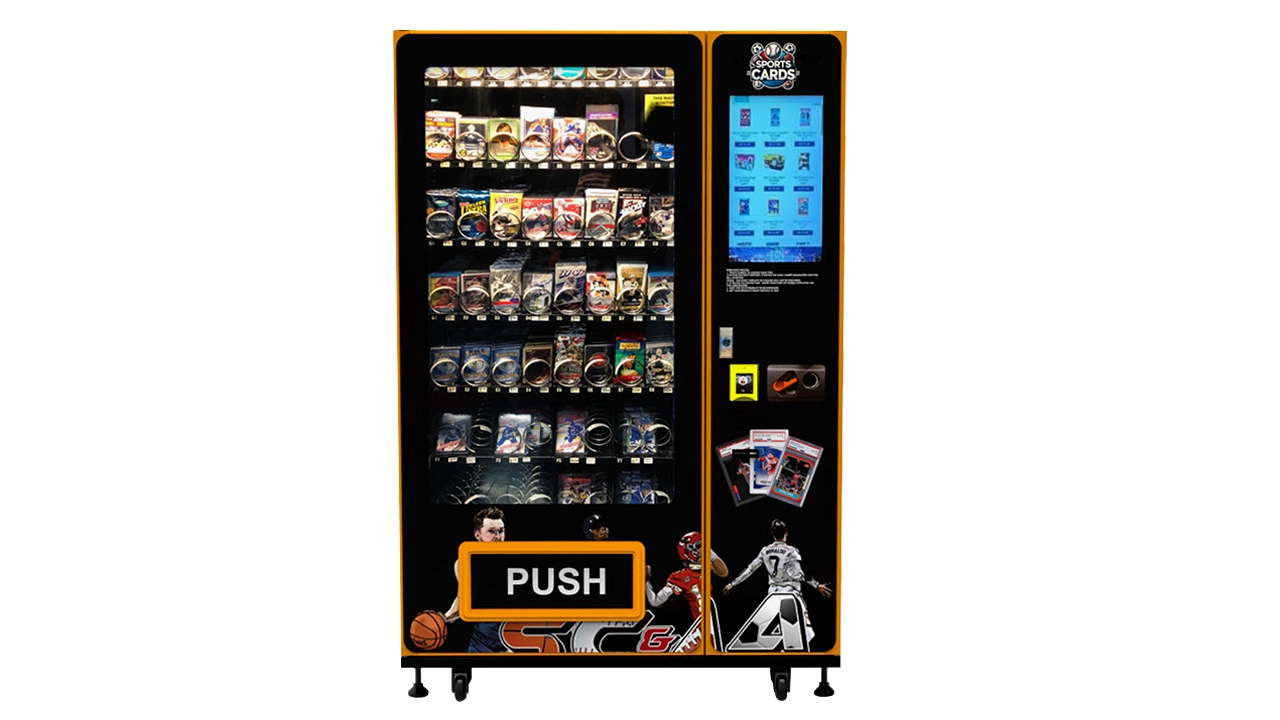
Another consideration is whether the machine has a screen that can display instructions for first-time users. I have found that a 32-inch touchscreen trading card vending machine with clear visual prompts for tapping your card reduces the number of abandoned transactions significantly. Older machines with just a small LCD screen and a card reader often confuse people who are not familiar with self-service kiosks, especially older collectors who are used to buying from a human behind a counter. The touchscreen also lets you display the full card catalog, which increases the likelihood that a customer will find something they want to buy.
You should also think about the connectivity requirements. Contactless payment systems need a stable internet connection to process transactions, and that usually means either Wi-Fi or a cellular modem. I have learned to always install machines with a 4G LTE backup, because location Wi-Fi is notoriously unreliable in retail environments. One of my machines in a mall food court kept losing its Wi-Fi connection every time the neighboring restaurant turned on their industrial dishwasher, and I lost a full weekend of sales before I figured out what was happening. A cellular modem costs a bit more per month, but it pays for itself the first time your primary connection fails.
Realistic Cost Breakdown for a Card Vending Machine
Let me give you a realistic picture of what you are going to spend, because there is a lot of misleading information out there. A basic card vending machine with a cashless payment system will cost you anywhere from $4,500 to $8,000 if you buy new from a reputable manufacturer. If you want a larger machine with a touchscreen, multiple product dispensers, and a more robust payment system, you are looking at $9,000 to $15,000. That might sound like a lot, but consider that a traditional snack vending machine with a card reader will cost you a similar amount, and the gross margins on trading cards are significantly higher than on candy bars.
Installation and setup costs are another factor that new operators often underestimate. You will need to pay for shipping, which can be $300 to $600 depending on the machine size and your location. You may also need to hire an electrician to install a dedicated outlet, especially if the machine requires more power than a standard wall socket can provide. I have paid anywhere from $150 to $400 for electrical work, depending on the complexity of the installation. If you are placing the machine outdoors, you will also need to consider weatherproofing and potential permits, which adds another layer of cost.
On the operating side, you have ongoing expenses like payment processing fees, which typically run 2.5% to 3.5% of each transaction, plus a small monthly fee for the payment gateway. You also have the cost of the cards themselves, which is your biggest variable expense. If you are buying booster packs wholesale, you might pay $2.50 to $3.50 per pack and sell them for $5 to $7, which gives you a gross margin of around 50% before operating costs. For single cards, the margin can be even higher, especially if you are buying bulk lots of commons and uncommons for pennies and selling them for a dollar or more each.
I have seen operators claim that you can make $1,000 per month from a single card machine in a good location, and that is not unrealistic if you choose the right spot and keep the machine well-stocked. However, I have also seen machines that did less than $200 per month because they were placed in a location with low foot traffic or the wrong product mix. The range is wide, and you should not go into this expecting a fixed return. According to IBISWorld data on the vending machine industry in the U.S., average annual revenue per vending machine across all categories is around $7,000 to $8,000, but card machines in high-traffic locations can significantly outperform that average if operated correctly.
Location Evaluation: What I Look For Before Placing a Machine
Location is the single biggest factor that determines whether your card vending machine makes money or just collects dust. I have developed a checklist over the years that I use to evaluate potential spots, and I am happy to share it because it has saved me from making some costly mistakes. First, I look for locations with at least 500 people passing by per day, and ideally more than 1,000 if the machine is in a retail setting. That is not a hard rule, but it is a good starting point. A comic shop or a hobby store with a steady stream of regular customers can be a great location even with lower foot traffic, because the people who pass through are already interested in the product category.
The second thing I evaluate is the demographic fit. Trading cards appeal primarily to males aged 10 to 35, so I look for locations that attract that audience. College campuses, gaming stores, card shops, and even certain gyms have worked well for me. I have also had success with laundromats and bowling alleys, which have a more general audience but high dwell time, meaning people are hanging around for a while and have time to browse the machine. The key is to match the product to the audience, and not every location is a good fit for trading cards.
I also pay close attention to the location owner’s attitude toward the machine. If the owner is enthusiastic and willing to help promote it, that is a huge advantage. One of my best-performing machines is at a small card shop where the owner actively tells customers about the machine and even points out when new inventory has been added. Another machine I placed at a big-box retail store did terribly because the store management did not care about it and never mentioned it to anyone. The machine was technically in a high-traffic area, but it was tucked in a corner and nobody noticed it.
Another critical factor is security. Card vending machines are targets for theft, especially in areas with high crime rates. I have had machines broken into twice, and both times it was in locations that I had flagged as marginal on security. The first time, thieves pried open the door and stole about $300 worth of cards. The second time, they tried to drag the whole machine out of a convenience store and damaged the door in the process. I now avoid locations where there is no surveillance camera or where the store owner cannot commit to keeping an eye on the machine. If you want to read more about specific placement strategies, I wrote a detailed breakdown on trading card vending machine placement that covers the nuances of different venue types.
You should also consider the hours of operation of the location. A machine at a 24-hour laundromat has the potential to sell more than a machine at a shop that closes at 6 PM, simply because it has more hours of exposure. However, unattended hours also increase the risk of vandalism and require more frequent monitoring. I have found that locations open 12 to 16 hours a day strike the best balance between sales potential and security risk.
Comparing Different Machine Types and Configurations
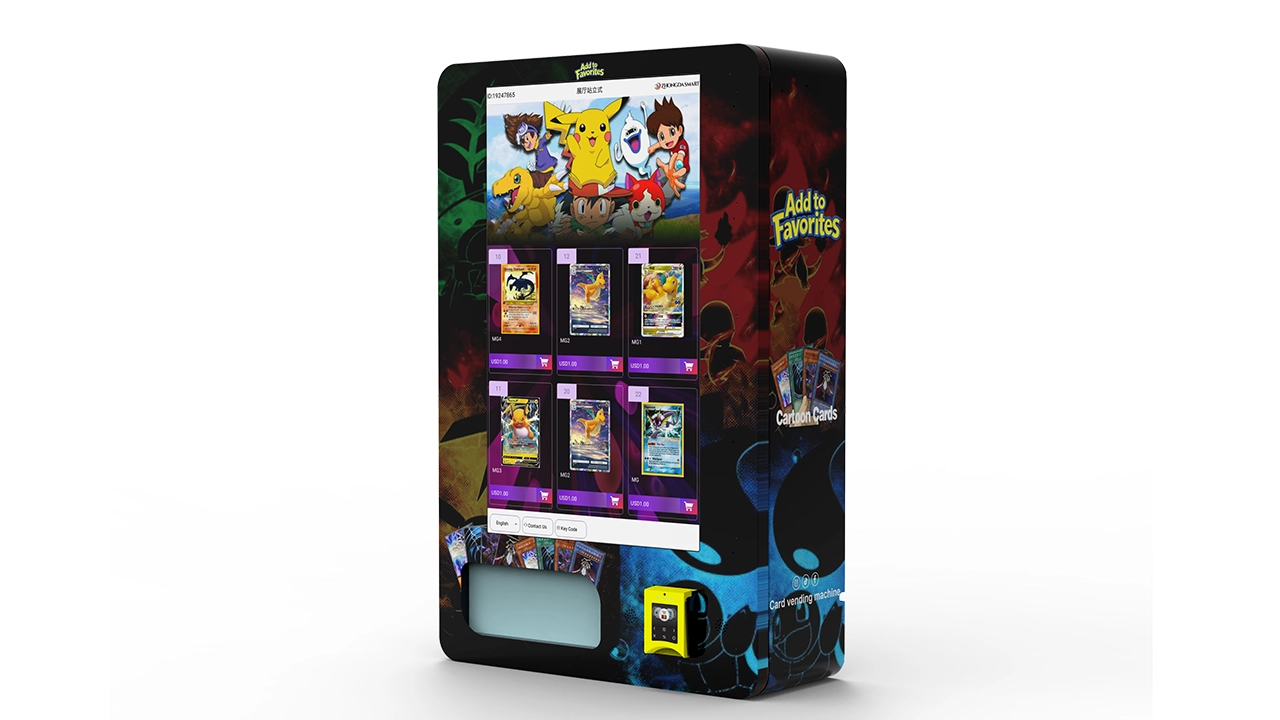
One of the most common questions I get from new operators is whether they should buy a small wall-mounted unit or a larger freestanding machine. There is no single right answer, but I can give you a framework for thinking about it based on your budget and your location strategy. Small wall-mounted units are cheaper, easier to install, and can fit in tighter spaces, but they have limited inventory capacity and often cannot handle the high demand of a busy location. Larger freestanding machines hold more product and can offer a better selection, but they are more expensive and require more floor space.
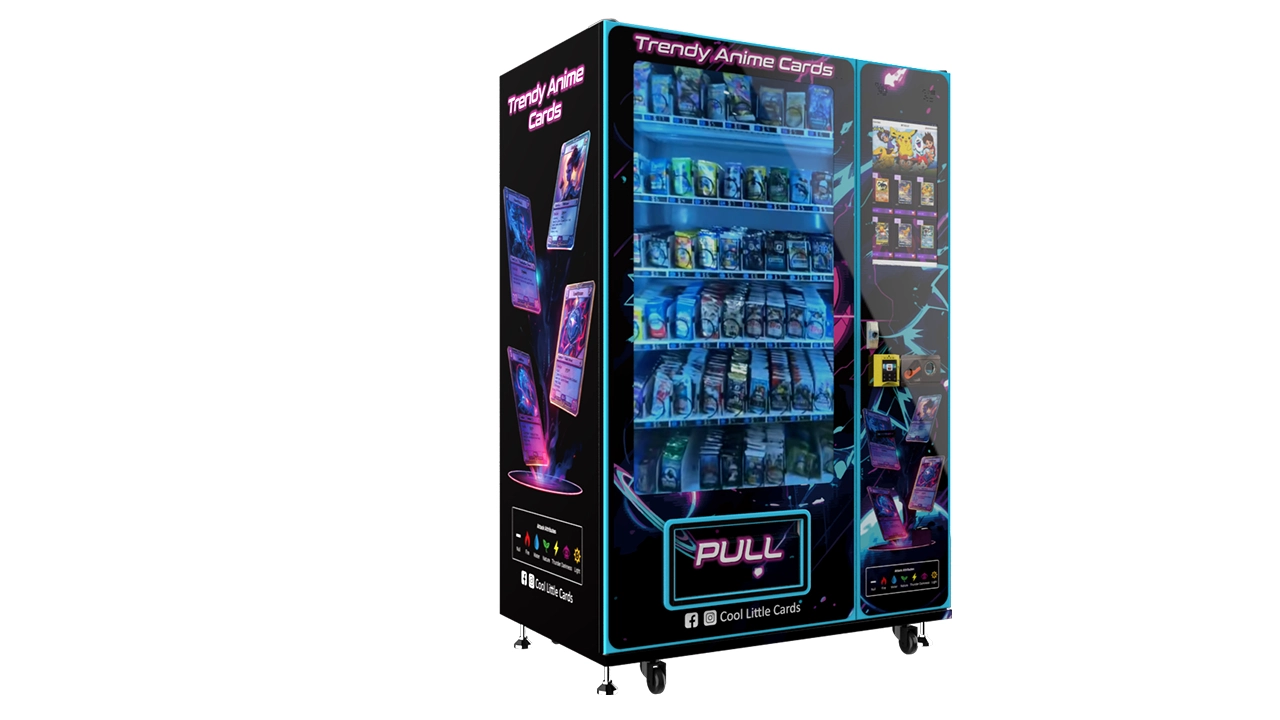
I have also experimented with different payment configurations, and I have found that machines with both a card reader and a cash acceptor tend to perform better than cashless-only machines, even though cash sales are a small percentage of total revenue. Some older collectors still prefer cash, and if you exclude them, you are leaving money on the table. However, cash adds a maintenance burden because you have to collect and count coins and bills, and you have to deal with the risk of cash being stolen. If you are just starting out, I would recommend a cashless-only machine to keep things simple, and then add cash capability later if you find it is necessary.
| Machine Type | Initial Investment | Monthly Revenue Potential | Inventory Capacity | Best For |
|---|---|---|---|---|
| Wall-mounted card machine | $3,500 – $6,000 | $300 – $900 | 100 – 200 items | Small shops, waiting rooms, low-traffic spots |
| Freestanding basic machine | $6,000 – $10,000 | $800 – $1,800 | 300 – 600 items | Card shops, hobby stores, mid-traffic retail |
| Freestanding touchscreen machine | $9,000 – $15,000 | $1,500 – $3,500 | 500 – 1,000 items | High-traffic retail, malls, entertainment venues |
As you can see from the table, the investment scales with the potential return, but so does the risk. A larger machine in a bad location will lose you more money than a small machine in a bad location, so do not buy a bigger machine than you need just because it looks more impressive. Start small, prove the concept in one or two locations, and then scale up as you learn what works in your specific market.
Supplier Selection and What to Avoid
Choosing the right supplier is one of the most important decisions you will make, and I have learned this through both good and bad experiences. I have worked with several manufacturers over the years, and I have settled on a few criteria that I use to evaluate any new supplier. First, I look for a manufacturer that has been in business for at least five years and has a track record of producing reliable machines. You can check this by looking at online reviews, asking for references, and even visiting their factory if you can. A supplier that is willing to show you their production facility is usually more confident in their product quality.
Second, I look for a supplier that offers good after-sales support. This includes having a technical support team that can answer your questions by phone or email, a warranty that covers at least one year on the major components, and a parts inventory that ensures you can get replacement parts quickly. I have had suppliers who were great at selling me the machine but disappeared when I needed help with a technical issue, and that is a nightmare you want to avoid. One manufacturer that has consistently impressed me with their support is Zhongda Smart, which I have used for several of my machines. They offer solid build quality and their technical team actually responds to emails, which is more than I can say for some of the cheaper options I have tried.
Third, I look at the payment system that the supplier uses. You want a supplier that partners with well-known payment processors like Nayax, USA Technologies, or Cantaloupe, because these companies have robust infrastructure and reliable customer support. If a supplier uses a no-name payment processor, you are taking a risk that the system will be glitchy or that the processor will go out of business, leaving you with a machine that cannot process payments. I have seen this happen to other operators, and it is an expensive lesson to learn.
Finally, I look at the total cost of ownership, not just the upfront price. A machine that is $2,000 cheaper but breaks down twice as often will cost you more in the long run when you factor in lost sales, repair calls, and the frustration of dealing with location owners who are unhappy with a non-functioning machine. I have written a more detailed guide on choosing a trading card vending machine supplier that covers the specific questions you should ask before making a purchase.
Maintenance, Restocking, and Daily Operations
Once your machine is on location, the real work begins. Restocking frequency depends on your sales volume, but I typically restock my machines every one to two weeks. A machine that sells $1,500 per month in cards will need to be restocked about every ten days, depending on the product mix and the average transaction value. I have learned to track sales data closely so that I know which products are selling and which ones are just sitting in the machine taking up space. This data-driven approach has helped me increase revenue by rotating out slow-moving products and replacing them with items that customers actually want.
Maintenance is another ongoing responsibility that you cannot ignore. Card vending machines have moving parts that wear out over time, and the card reader is the most common point of failure. I budget about $50 to $100 per month per machine for maintenance and unexpected repairs, and I have found that this is usually sufficient if you are using quality equipment. You should also clean the machine regularly, both to keep it looking professional and to prevent dust and dirt from causing mechanical issues. A dirty machine is not only unattractive to customers, but it can also lead to problems with the card dispenser and the payment system.
One of the most important operational lessons I have learned is to build a relationship with the location owner. The owner is your eyes and ears on the ground, and they can alert you to problems before they become serious. I give each location owner my personal phone number and tell them to call me if anything seems off with the machine. I have had owners call me to report that the machine was making a strange noise, which turned out to be a jammed card dispenser, and I was able to fix it before it caused more damage. Conversely, I have had owners who did not care about the machine and did not report issues, which led to bigger problems and longer downtime.
You also need to have a plan for handling customer complaints. If a customer pays for a card and the machine fails to dispense it, that is a bad experience that can destroy trust in the machine and the location. I have a policy of always refunding the customer and giving them a free pack on top of that, because the cost of a pack is worth more than the cost of a negative review. This is a small price to pay for maintaining a good reputation, and it has helped me keep locations happy and customers coming back.
Comparing Self-Operated, Leased, and Revenue-Share Models
When you are starting out, you have a choice between buying your own machine, leasing one, or entering into a revenue-share agreement with a location or a machine provider. Each model has its pros and cons, and I have used all three at different points in my career. Buying your own machine gives you the most control and the highest profit potential, but it also requires the most capital upfront and carries the most risk if the machine does not perform well. Leasing reduces your upfront cost but typically locks you into a contract with monthly payments, and the total cost over time is usually higher than buying.
Revenue-share agreements are interesting because they can reduce your risk, but they also reduce your profit margin. In a typical revenue-share arrangement, the location owner provides the floor space and sometimes the electricity, and you provide the machine and the inventory. You then split the revenue, usually 50/50 or 60/40 in your favor. I have found that revenue-share agreements work best in locations where you are not sure about the sales potential, because you are not paying rent and your downside is limited to the cost of the inventory and your time. However, if the machine performs well, you are giving up a significant portion of the profit that you would keep if you owned the machine outright.
I have also seen operators who lease machines from third-party companies that specialize in vending equipment financing. This can be a good option if you do not have the capital to buy a machine outright, but you need to read the terms carefully. Some leases have hidden fees, and the interest rates can be high, especially if you have less-than-perfect credit. I have seen operators pay almost twice the cost of the machine over the life of the lease, which makes it hard to turn a profit. If you can afford to buy, I generally recommend buying over leasing, but I understand that not everyone has the capital to do so.
| Model | Upfront Cost | Monthly Cost | Profit Potential | Risk Level |
|---|---|---|---|---|
| Self-operated (own machine) | $5,000 – $15,000 | Low (maintenance, fees) | High | Medium |
| Leased machine | Low (down payment) | $200 – $500 lease payment | Medium | Medium |
| Revenue-share with location | Low (inventory only) | Revenue split | Medium | Low |
My advice for a newcomer is to start with a single machine that you own, placed in a location that you know well and that has a natural audience for trading cards. This gives you the best learning experience and the highest potential return, without the complexity of a lease or the reduced profit of a revenue-share agreement. Once you have proven that you can operate one machine profitably, you can expand from there, using the revenue from your first machine to fund your second and third.
Common Mistakes I See New Operators Make
I have been in this industry long enough to see a lot of new operators make the same mistakes, and I want to help you avoid them. The biggest mistake is buying a machine without doing proper location research. I once met a guy who bought a $10,000 touchscreen machine and placed it in a small convenience store in a residential neighborhood. The store had maybe 200 customers per day, and most of them were buying milk and bread, not trading cards. The machine did about $150 in its first month, and the operator was devastated. He had not done the basic research to figure out whether there was a demand for trading cards in that area.
The second biggest mistake is underestimating the importance of inventory selection. You cannot just fill the machine with random cards and hope they sell. You need to understand which cards are popular in your local market, and that requires tracking sales data and staying up to date with the latest trends in the hobby. I have seen operators who stocked their machines with old, unsellable cards because they bought a bulk lot from a liquidator without checking what was inside. Those machines sat untouched for months, and the operator eventually had to sell the cards at a loss just to free up space in the machine.
The third mistake is neglecting the payment system. I have already talked about how important contactless payment is, but I want to emphasize that you should also test your payment system regularly and keep the firmware updated. Payment processors frequently update their security protocols, and if your machine is not updated, it may stop accepting certain cards. I have had machines that worked fine for months and then suddenly started rejecting a specific type of card because the payment processor had updated their system and the machine had not. This is a simple fix, but it requires you to be proactive about monitoring your machines.
Another mistake is not budgeting for ongoing costs. You need to have a reserve fund for repairs, inventory, and unexpected expenses. I recommend having at least $1,000 to $2,000 in reserve for each machine you operate, because you never know when a card reader will fail or when you will need to buy a new batch of inventory. Operators who do not have a reserve fund often find themselves in a position where they cannot afford to restock the machine, which leads to lost sales and a negative reputation with the location owner.
Finally, I see new operators who give up too quickly. Card vending machines are not a get-rich-quick scheme, and it takes time to build up a customer base and learn what works in each location. I have had machines that were slow for the first few months and then suddenly took off as word spread and the product mix improved. If you are patient and willing to learn from your mistakes, you can build a profitable operation, but if you expect immediate results, you will be disappointed.
Realistic Return on Investment and Payback Period
Let me give you a realistic picture of the return on investment that you can expect from a card vending machine. Based on my experience and the data I have collected from my own route, a well-placed machine with a good product mix and a reliable contactless payment system can generate $800 to $2,500 per month in revenue. After subtracting the cost of goods sold, which is typically 40% to 50% of revenue, and operating costs like payment processing fees, maintenance, and restocking labor, you are looking at a net profit of $300 to $1,200 per month per machine.
This means that a $7,000 machine in a decent location will pay for itself in about 8 to 18 months, depending on how well it performs. I have had machines that paid for themselves in under six months, but those were exceptional locations with high foot traffic and a strong demand for cards. I have also had machines that took over two years to pay for themselves because they were in mediocre locations or had inventory issues. The payback period is highly variable, and you should not go into this expecting a fixed return.
One thing that can significantly improve your return on investment is to focus on higher-margin products. Single cards, especially rare or sought-after cards, can have margins of 70% to 80% if you buy them at the right price. Booster packs have lower margins, but they are easier to source and have a more consistent demand. I have found that a mix of 60% single cards and 40% booster packs gives me the best balance of margin and sales velocity. You can read more about maximizing profit per square foot in my earlier article, which goes into more detail on product mix optimization.
It is also important to consider the secondary market for your machines. If you decide to exit the business, you can usually sell a well-maintained machine for 50% to 70% of what you paid for it, depending on the age and condition. This reduces your effective cost and makes the investment less risky. However, you should not rely on being able to sell your machine for a good price, because the market for used card vending machines is not as liquid as the market for new machines.
Legal and Regulatory Considerations
Depending on where you live, there may be legal requirements that you need to comply with when operating a card vending machine. In the United States, the rules vary by state and by locality, so you need to do your research before placing a machine. Some states require a vending machine license, which typically costs $50 to $200 per year. Others require you to collect and remit sales tax on the products you sell, which means you need to register with the state tax authority and file regular returns. The U.S. Small Business Administration has a helpful guide on federal and state tax ID requirements that is a good starting point.
You also need to be aware of local zoning laws and permit requirements. Some municipalities have restrictions on where vending machines can be placed, especially if they are outdoors or in public spaces. I have had to deal with a situation where a city inspector told me that my machine was not allowed because it was blocking a fire exit, even though the location owner had assured me it was fine. That was a costly mistake that could have been avoided if I had checked with the city before installation.
In the European Union, the regulatory landscape is different, and you need to comply with the General Data Protection Regulation if your machine collects any personal data, which is unlikely for a simple card vending machine but still worth considering if you add features like customer loyalty programs. You also need to ensure that your machine meets the CE marking requirements for electrical safety and electromagnetic compatibility. If you are operating in the EU, it is a good idea to consult with a local business advisor who understands the specific regulations in your country.
FAQ: Card Vending Machine Questions I Get Asked All the Time
Are card vending machines actually profitable?
Yes, they can be profitable if you choose the right location and manage your inventory well. Based on my experience, a good machine in a high-traffic location can generate $800 to $2,500 per month in revenue, with net profits of $300 to $1,200 after costs. However, a poorly placed machine can lose money, so you need to do your homework before investing. According to IBISWorld data, the average vending machine in the U.S. generates around $7,000 to $8,000 per year, but card machines in good locations can outperform that significantly.
How much does a card vending machine cost?
A basic card vending machine with a contactless payment system will cost you $4,500 to $8,000 if you buy new. A larger machine with a touchscreen and higher capacity will cost $9,000 to $15,000. You also need to budget for shipping, installation, and ongoing maintenance, which adds another $1,000 to $2,000 in the first year. Used machines are available for less, but they come with higher risk of mechanical issues.
How long does it take to pay back the investment?
The payback period depends on the location and how well the machine performs. I have seen machines pay for themselves in as little as six months in exceptional locations, but it is more common to see a payback period of 12 to 18 months. You should not expect to make your money back overnight, and you should be prepared for the possibility that it could take two years or more in a mediocre location.
Should a beginner buy or lease a machine?
If you have the capital, I generally recommend buying a machine rather than leasing, because the total cost over time is lower and you have more control over the operation. However, if you do not have the capital or you want to test the waters before committing, leasing can be a reasonable option. Just be sure to read the lease terms carefully and understand the total cost over the life of the lease.
Where is the best place to put a card vending machine?
The best locations are places with high foot traffic and a natural audience for trading cards. Card shops, hobby stores, comic book stores, and gaming venues are ideal. College campuses, laundromats, and bowling alleys can also work well if they have enough foot traffic and the right demographic. I have written a detailed guide on evaluating foot traffic for card vending machines that goes into more depth on this topic.
What permits or licenses do I need to operate a card vending machine?
The requirements vary by state and locality. You may need a vending machine license, a sales tax permit, and possibly a business license. You should check with your local city or county government and your state tax authority to understand the specific requirements in your area. The U.S. Small Business Administration has resources to help you understand the requirements.
How do I choose a reliable supplier?
Look for a supplier with at least five years in business, good after-sales support, and a partnership with a reputable payment processor. Ask for references and check online reviews. I have had good experiences with Zhongda Smart, but you should do your own research and compare multiple suppliers before making a decision. You can also read my guide on vending machine supplier evaluation criteria for more details.
What should I do if the machine breaks down?
First, check the basics like power and connectivity. If the issue is with the card reader, you may be able to swap it out if you have a spare. For more serious issues, you will need to contact the manufacturer or a local technician. I recommend having a spare card reader and a basic toolkit on hand, and maintaining a relationship with a local vending machine repair technician who can help you with complex problems.
How can I reduce restocking and maintenance costs?
The best way to reduce restocking costs is to track sales data and only stock products that are selling well. This reduces the amount of dead inventory that takes up space in the machine. For maintenance, use quality equipment and perform regular cleaning and inspections to catch problems early. You can also reduce maintenance costs by choosing a machine with modular components that are easy to replace.
Final Thoughts on Running Card Vending Machines
Running card vending machines is not a passive income stream; it requires ongoing effort, attention to detail, and a willingness to learn from your mistakes. The operators who succeed are the ones who treat it like a real business, with proper planning, financial management, and customer service. If you are willing to put in the work, the potential returns are solid, and the business can scale nicely as you add more machines and refine your location strategy.
I have seen a lot of changes in this industry over the past decade, and the shift to contactless payment has been one of the most significant. Machines that do not support tap-to-pay are quickly becoming obsolete, and I would not recommend buying any machine that does not have a reliable contactless payment system. The technology is mature, the costs are reasonable, and the customer expectation is clear. If you are just starting out, focus on getting the fundamentals right: a good location, a reliable machine, a solid product mix, and a payment system that your customers can use without friction.
There is also a useful resource I have been maintaining at wall-mounted card vending machine configurations, which covers the pros and cons of smaller units for operators who are short on space or capital. And if you are thinking about a larger machine, the 32-inch touchscreen model is worth a look for high-traffic locations.
Disclaimer: The figures and insights in this article are based on my personal experience operating card vending machines and publicly available industry data. Actual results will vary depending on location, foot traffic, product mix, and operating efficiency. This content is for informational purposes only and does not constitute financial advice. You should perform your own research and consult with a qualified advisor before making any investment decisions.