If you’re looking at how to sell sports card packs in a vending machine, the short answer is yes, it works, but only if you treat it like a retail operation, not a passive side hustle. I’ve been running automated retail locations for over a decade, and I’ve seen card vending machines generate serious monthly revenue in the right spots, and I’ve also seen operators lose money because they skipped the basics. The difference usually comes down to location, machine quality, and how fast you react to sales data. In this guide, I’ll walk you through what I’ve learned from real installs, including cost breakdowns, supplier red flags, maintenance traps, and the exact metrics I use to decide if a location is worth the rent.
Why Sports Card Vending Machines Are a Different Beast
Most vending machines sell consumables. Snacks, drinks, even electronics have a predictable restock cycle. Sports card packs are different because they tap into a collector’s emotional pull. That changes how you approach inventory, pricing, and even machine placement. A collector isn’t buying because they’re thirsty. They’re buying because they hope to hit a rare card worth more than the pack. That hope drives repeat purchases in a way that a soda machine can’t match.
But that same psychology cuts both ways. If your machine is empty, or if the card selection looks stale, collectors will walk away and won’t come back. I’ve learned that a card vending machine needs to feel like a mini hobby shop, not a gumball dispenser. That means clear visibility, fresh stock, and a machine that doesn’t jam or eat money.
From an operational standpoint, the margins are better than most vending categories. A typical snack vending margin sits around 20 to 30 percent. Card packs can run 40 to 50 percent gross margin if you buy smart. But you also have higher volatility. Some weeks you’ll sell out of everything, and other weeks you’ll wonder if the machine is even plugged in. That’s normal. The key is having enough locations to smooth out the swings.
I’ve also noticed that card vending machines attract a different crowd than traditional vending. You get serious collectors, kids with allowance money, and parents buying for their kids. That mix means your payment system has to be dead simple. If a 12-year-old can’t figure out how to buy a pack, you’re losing sales.
Upfront Costs and Realistic Return Timelines
Let’s talk money, because that’s what everyone asks first. A new, purpose-built sports card vending machine with a touchscreen and card dispenser will run you anywhere from $6,000 to $15,000 depending on the size and features. I’ve seen cheaper units online, but I’d be careful. A flimsy dispenser will jam on foil packs, and then you’re losing money to service calls.
If you’re looking at a used or refurbished unit, expect to pay $3,000 to $7,000. That can be a smart entry point, but only if you inspect the card dispensing mechanism personally. I once bought a used machine that looked great on the outside, but the card tray was warped. It cost me $400 in service calls before I finally replaced the whole dispenser assembly.
On the revenue side, a good location can gross $1,500 to $4,000 per month. That’s not a promise, it’s an observed range from my own routes and from talking to other operators. A mediocre location might only do $300 to $600. The difference is foot traffic, demographic fit, and whether the machine is actually visible.
Your payback period will depend heavily on those numbers. At the higher end of revenue, you can recoup your investment in 4 to 7 months. At the lower end, it might take 18 months or longer. I always tell new operators to plan for a 12-month payback. If it comes faster, great. If not, you’re not caught off guard.
What I Wish I Knew About Operating Costs
Most people only think about the machine cost. They forget about payment processing fees, which run about 2.5 to 3.5 percent per transaction. Then there’s inventory. You’ll need $2,000 to $5,000 in card stock to fill a machine properly. That’s a real cash outlay that sits on your shelf.
Don’t forget maintenance. I budget about 10 percent of gross revenue for repairs and replacement parts. Some months it’s zero. Other months you’ll replace a card sensor or a payment reader and eat $300. If you’re not setting money aside for that, you’ll get caught short.
Electricity is a minor cost, maybe $10 to $20 per month, but if you’re in a location that charges high commercial rates, it adds up. And if you’re leasing space, rent can be a flat fee or a percentage of sales. I’ve seen deals range from $50 per month to 20 percent of gross. You have to factor that into your break-even math.
One thing that surprised me early on was theft and vandalism. Card vending machines are targets because the product is small and valuable. You need a machine with a solid steel cabinet and a good locking system. I’ve had a machine broken into once, and it was a $1,200 loss. That’s not common, but it happens.
Equipment Selection: What Actually Matters
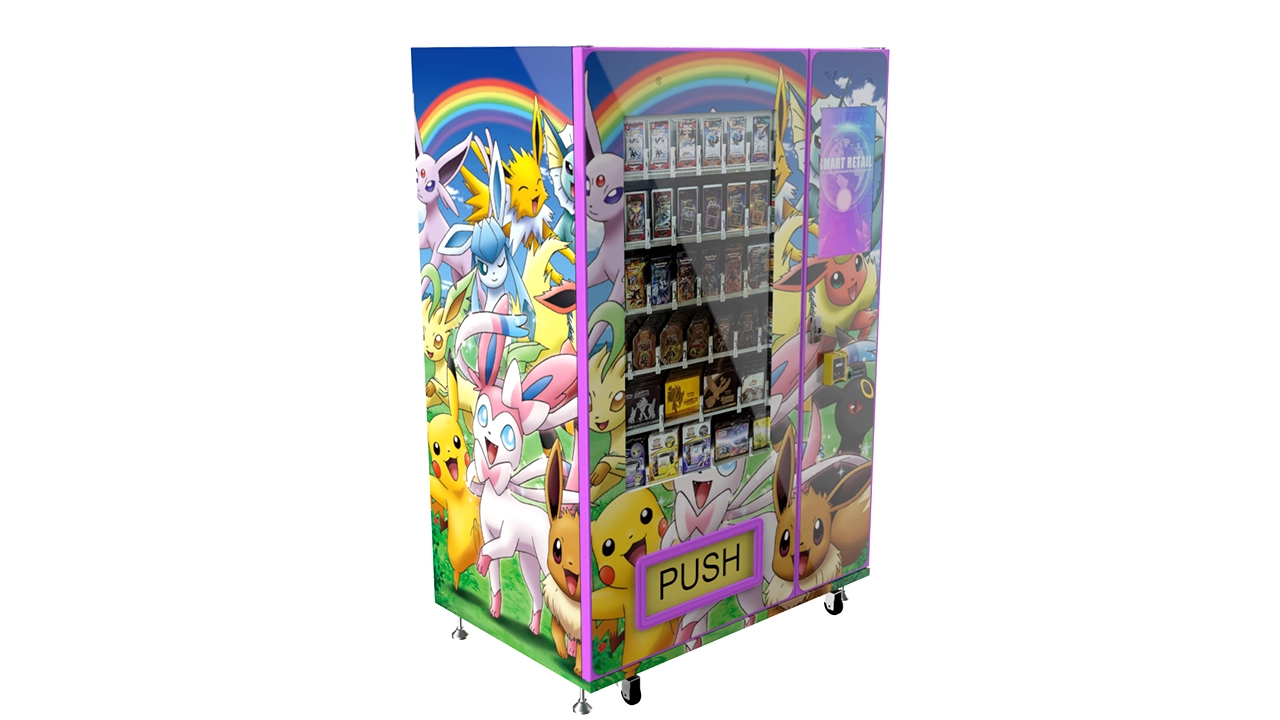
Not all card vending machines are built the same. The biggest differentiator is the dispensing mechanism. Some machines use a spiral system, others use a gravity-fed tray, and some use a robotic arm. Each has pros and cons.
Spiral systems are common and reliable for boxed products, but they can struggle with foil packs that are slightly bowed. Gravity-fed trays are simple and less likely to jam, but they can drop multiple packs if the sensor isn’t adjusted right. Robotic arms are cool and showy, but they’re more complex and cost more to repair.
I’ve had the best luck with machines that have a dedicated card dispenser designed for trading card packaging. Those are usually engineered to handle the exact dimensions of a wax pack or a box. That might sound obvious, but I’ve seen operators try to use a snack machine with custom shelves, and it’s a nightmare.
Another thing to consider is the screen and user interface. A 32-inch touchscreen machine looks great and can drive engagement, but it also costs more and has more failure points. I have one location where the touchscreen is the main attraction, and it works well. But for a basic location, a simple keypad with a glass front is fine.
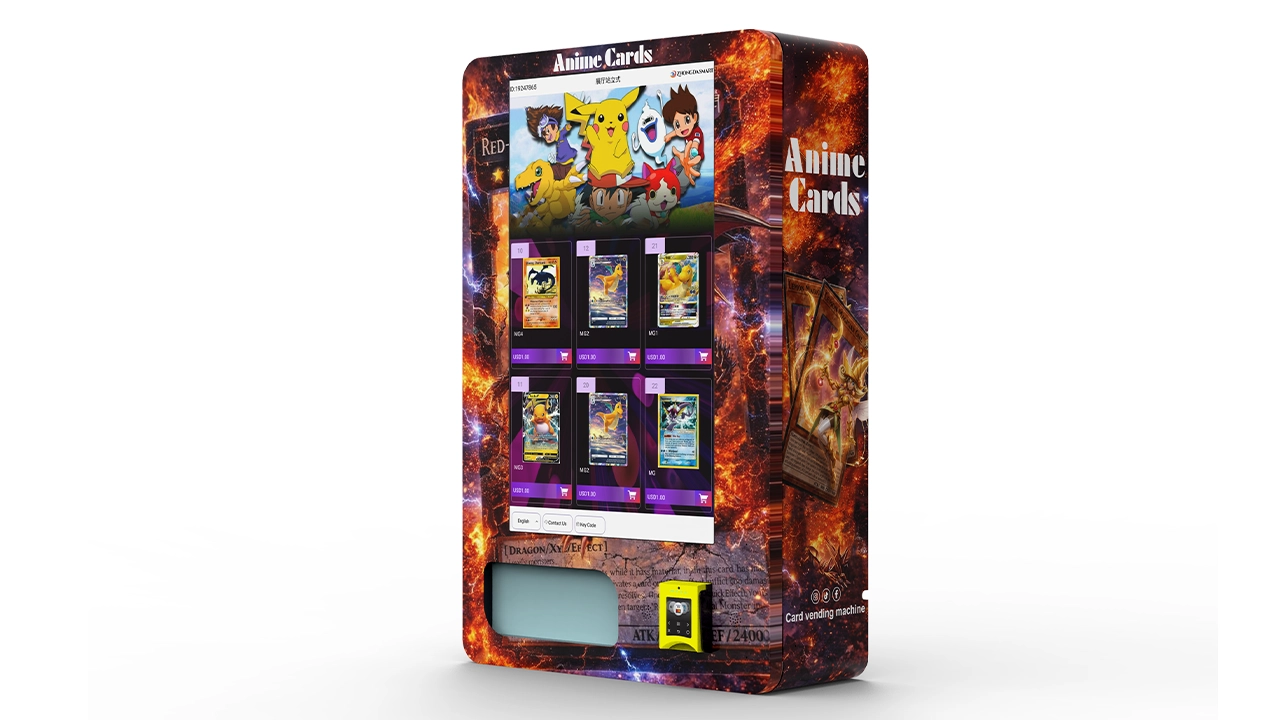
If you’re exploring options, take a look at some trading card vending machine examples to see what features are common in the market. I’ve also seen wall-mounted units that work well in tight spaces like convenience stores or hobby shops. Those are cheaper and easier to place, but they hold less inventory.
Manual vs. Automated Dispensing
There’s a split in the market between fully automated machines and semi-automated ones where the customer selects a product and the machine brings it to a pickup bin. I prefer fully automated for card packs because it reduces theft and ensures the customer actually receives what they paid for.
But I’ve also seen operators use a hybrid model where the machine displays a menu, and the customer pays, and then a staff member hands over the product. That’s not a true vending machine, but it can work in a hobby shop during staffed hours. The downside is that it defeats the purpose of 24/7 automated retail.
For my own routes, I stick with automated dispensing. It’s more reliable, and it lets me place machines in locations where there’s no staff to assist. That’s the whole point of a self-service kiosk. If you need staff involvement, you’re limiting your location options.
One piece of advice: buy a machine that has a “test mode” so you can run through a full purchase cycle without using real money. That saved me countless headaches when I was learning how to load and calibrate the machine.
Site Selection: The Metric That Predicts Success
I can’t stress this enough: location is 80 percent of the battle. I’ve placed machines in high-traffic retail areas that failed because the demographic was wrong, and I’ve placed machines in lower-traffic hobby shops that did great because every person who walked in was a potential buyer.
The first metric I look at is foot traffic. But not just any foot traffic. I want to know how many people in that traffic are likely to buy a sports card. A mall with 10,000 visitors a day sounds great, but if they’re mostly there for clothing and food, you might do better in a niche store with 500 visitors a day.
I use a simple rule: the location needs at least 50 to 100 card-buying customers per week to be viable. How do I estimate that? I count the number of people who stop and look at the machine, and I track how many convert to buyers. Over time, you get a feel for it.
Another metric is the average transaction value. In a good location, customers buy more than one pack. They might buy three or four packs, or a box. If your average transaction is under $10, you’re probably in a lower-value location. If it’s over $20, you’ve found a collector-heavy spot.
Real Estate Considerations and Lease Terms
When you negotiate a lease, don’t sign a long-term agreement until you’ve tested the location for at least three months. I’ve made the mistake of signing a one-year lease based on a location owner’s promises, and the traffic never materialized. Now I always ask for a month-to-month or a 90-day trial period.
Rent can be structured as a flat fee or a commission. I prefer a flat fee because it’s predictable. But if the location owner insists on a commission, I try to cap it at 15 to 20 percent of gross. Anything higher, and your margins get squeezed.
Also, pay attention to the power supply. You need a dedicated outlet near the machine. I’ve had locations where the only outlet was behind a heavy shelf, and I had to pay an electrician to run a new line. That’s an extra $200 to $400 you don’t want.
Visibility is another factor. The machine should be visible from the main aisle or entrance. If it’s tucked in a corner, people won’t notice it. I’ve moved machines from a back corner to the front of a store and seen sales double. That’s a cheap fix that pays off.
Inventory: What to Stock and What to Skip
Card selection is where you make or lose money. You can’t just stock any packs. You need to know what’s hot in the current market. That changes every few months, so you have to stay on top of release calendars and collector trends.
I always keep a mix of three tiers: low-end packs for kids and casual buyers, mid-tier packs for regular collectors, and high-end boxes for serious hobbyists. The low-end stuff sells in volume but has thin margins. The high-end stuff has fat margins but sells slowly. The mid-tier is your bread and butter.
One mistake I see new operators make is overstocking on a hot product. If a new set drops and it’s all over social media, you might be tempted to buy 50 boxes. But if the hype fades in three weeks, you’re stuck with inventory that nobody wants. I learned this the hard way with a basketball set that was red-hot for a month, then went cold. I was sitting on $3,000 of dead stock.
My rule now is to buy enough for 4 to 6 weeks of projected sales. If it sells out faster, I reorder. If it sits, I discount it or move it to another location. That keeps my inventory fresh and my cash flow moving.
Using Sales Data to Adjust Your Mix
Every time I restock a machine, I look at what sold and what didn’t. That sounds basic, but you’d be surprised how many operators just refill the same slots without paying attention. I track sales by SKU, and I review that data at least twice a month.
If a product hasn’t sold in 30 days, it gets rotated out. I move it to a lower-traffic location or I bundle it with a hot product. Sometimes I just take the loss and liquidate it online. Holding onto dead inventory is a slow bleed.
I also pay attention to the time of day and day of week when sales happen. That tells me when to schedule restock visits. If most sales happen on weekends, I make sure the machine is fully loaded by Friday. If there’s a spike on release day for a new set, I time my stock to arrive before that date.
This is where a machine with software reporting helps. Some machines give you real-time sales alerts. That’s a nice feature, but you can also do it manually with a simple log. The important thing is that you’re actually using the data, not just collecting it.
Payment Systems and the Self-Service Experience
Modern card vending machines need to accept cards, mobile payments, and ideally cash. I’ve found that card and mobile payments account for about 70 percent of my sales. Cash is still important, especially for younger buyers who get an allowance.
Your payment processor will charge a fee, typically 2.5 to 3.5 percent per transaction. That’s a cost of doing business, but you can shop around for better rates. Some processors specialize in vending machines and offer lower fees for high-volume operations.
The user experience matters more than you think. If the machine takes too long to process a payment, or if the screen is confusing, people will walk away. I’ve watched customers interact with my machines, and the ones that sell well have a clear, one-step process: select, pay, dispense.
I also recommend adding a “how to use” sticker on the machine. It sounds old-school, but it helps first-time users. And it cuts down on support calls from confused customers.
Why I Prefer a Self-Service Kiosk Model
The term “self-service kiosk” gets thrown around a lot, but for card vending, it’s the right model. A kiosk that’s always on, always stocked, and doesn’t need staff interaction is the most efficient way to sell low-cost, high-impulse items like card packs.
I’ve tested locations where the machine was placed next to a checkout counter, and staff would sometimes help customers. That helped, but it also created a bottleneck. When the staff was busy, sales dropped. The fully automated model removes that dependency.
If you’re considering a 32-inch touchscreen trading card vending machine, keep in mind that the screen will draw attention, but it also needs to be responsive. A laggy touchscreen is worse than no screen at all.
I’ve also seen operators add a small camera to the machine so they can monitor activity remotely. That’s a nice security feature, but it adds to the cost. If you’re in a high-risk area, it’s worth it.
Supplier Selection: How to Avoid Getting Burned
Finding a reliable supplier is harder than finding a good location. There are a lot of vendors out there, but not all of them are honest about machine quality or after-sales support.
I look for a supplier who can answer technical questions about the dispenser mechanism, not just a salesperson who reads from a brochure. If they can’t explain how the machine handles foil packs or what happens when a card gets jammed, that’s a red flag.
Another thing to check is the warranty and parts availability. A machine is only as good as its repair network. If you have to wait three weeks for a replacement sensor, you’re losing money every day. I ask suppliers about their average response time for parts and service.
One supplier that has been reliable in my experience is Zhongda Smart. They offer a range of card vending machines and have solid after-sales support. I’m not saying they’re the only option, but they’ve earned my trust over several installations. Just make sure you get a detailed spec sheet and a clear warranty agreement before you pay.
Red Flags in Supplier Contracts
Watch out for suppliers who require a large upfront payment with vague delivery dates. I’ve heard horror stories from operators who paid 50 percent down and waited six months for a machine that never arrived. Always use a payment method that gives you some protection, like a credit card or a letter of credit.
Also, be cautious about “exclusive” deals. Some suppliers will promise you exclusive rights to a machine model in your area, but that exclusivity is often not worth the paper it’s printed on. The machine is still available online, and you can’t enforce the exclusivity anyway.
Check the warranty terms carefully. Some warranties only cover the compressor or the main board, not the card dispensing mechanism. That’s a critical difference. You want a warranty that covers the entire machine for at least one year.
Finally, ask for references from other operators who have bought the same machine. A good supplier will have no problem connecting you with existing customers. If they hesitate, that’s a bad sign.
Common Mistakes and Lessons from Real Installations
I’ve made my share of mistakes, and I’ve also learned from watching others fail. The most common mistake is underestimating the importance of maintenance. A card vending machine is not a set-and-forget device. It needs regular cleaning, calibration, and occasional repairs.
One of my early failures was placing a machine in a laundromat. The foot traffic was decent, but the demographic was wrong. People were there to do laundry, not to buy sports cards. I let the machine sit for three months, losing money on rent and inventory, before I finally moved it. That was a $2,000 lesson.
Another mistake is buying a cheap machine to save money upfront. I bought a budget unit once, and the card dispenser jammed every other day. I spent more on service calls in two months than I would have spent on a better machine. I ended up scrapping the unit and buying a proper one.
On the flip side, I’ve had a big success placing a machine in a local hobby shop that also hosted card tournaments. The shop owner was happy because the machine drove sales without taking up staff time. That machine grossed over $3,000 in its first month. The key was that the audience was already there.
How to Recover from a Slow Location
If a location is underperforming, don’t just hope it gets better. Take action. First, check the product mix. Maybe you’re stocking the wrong brands or price points. Second, check the machine’s visibility. Maybe it needs to be moved a few feet to catch more attention.
If those don’t work, consider changing the payment options. I’ve seen locations where adding mobile payment boosted sales by 20 percent because younger buyers didn’t carry cash. That’s an easy fix.
If a location is still dead after 60 days, move the machine. I’ve learned not to be sentimental about a location. The machine is a business asset, and it needs to be where it generates revenue. Moving a machine costs $100 to $200 in labor and transport, but it’s worth it if the new spot is better.
I also track a simple metric: sales per square foot of machine footprint. That helps me compare locations fairly, even if the machines are different sizes.
Comparing Your Options: A Practical Table
To make things clearer, here’s a table I use when evaluating different setups. It’s based on my own experience and the ranges I’ve seen in the industry.
| Setup | Initial Investment | Monthly Gross Potential | Maintenance Level | Payback Period |
|---|---|---|---|---|
| New 32-inch touchscreen machine | $8,000 – $15,000 | $2,000 – $4,000 | Moderate | 5 – 9 months |
| Basic keypad machine | $5,000 – $8,000 | $1,200 – $2,500 | Low | 4 – 8 months |
| Wall-mounted unit | $3,500 – $6,000 | $800 – $1,800 | Low | 4 – 10 months |
| Used/refurbished machine | $2,500 – $5,000 | $600 – $1,500 | High | 5 – 12 months |
These are rough figures. Your actual results will vary based on location, rent, product pricing, and how quickly you adapt to sales data. But this gives you a starting point for your own projections.
Maintenance and Repair: What You Need to Know
Maintenance is the part that most new operators overlook. A card vending machine has moving parts, sensors, and a payment system. Any of those can fail. The key is to catch problems early before they cost you sales and repairs.
I do a basic check every time I restock. I test the card dispenser with a dummy pack, I check the payment reader, and I look for any jammed cards. That takes about five minutes. It’s saved me from many service calls.
For deeper maintenance, I schedule a professional service every 6 to 12 months. That costs $150 to $300 per visit, depending on your area. They’ll clean the sensors, lubricate moving parts, and check the software.
If you’re not handy, you need a local repair tech. I recommend finding one before you need them. Search for vending machine repair services in your area and ask if they’ve worked on card dispensers. Not all techs are familiar with them.
When to DIY and When to Call a Pro
Simple fixes like clearing a jammed card or rebooting the payment system you can do yourself. I’ve also replaced a card sensor on my own, but that required ordering the part and following a YouTube tutorial. It’s doable if you’re comfortable with basic electronics.
Anything involving the main board, the touchscreen, or the payment processor is better left to a professional. You don’t want to void the warranty or make a small problem worse.
I also keep a spare parts kit at home: a few sensors, a spare card tray, and a power supply. That costs maybe $200, but it means I can fix most issues myself without waiting for a part to ship.
If you’re buying a used machine, ask the seller if they have any spare parts they’re willing to throw in. Sometimes they do, and it can save you money later.
Regulations, Permits, and Local Compliance
Don’t assume you can just place a machine anywhere. Depending on your city or state, you may need a business license, a vending permit, or a sales tax registration. The rules vary widely, so check with your local small business office.
In the U.S., the Small Business Administration has a good overview of the licenses you might need. In Europe, rules differ by country, so consult your local chamber of commerce or business registry.
Sales tax on trading cards is another thing to consider. In many states, cards are taxable, and you’re responsible for collecting and remitting that tax. That’s an administrative burden, but it’s not hard once you set up a system.
Also, check with the location owner about their insurance requirements. Some commercial leases require you to carry liability insurance naming the property owner as an additional insured. That policy costs a few hundred dollars a year, and it’s worth it for peace of mind.
Trends and Market Data
The trading card market has grown significantly in recent years. According to Statista, the global trading card market was valued at over $12 billion in recent years, and it’s projected to keep growing. That’s a tailwind for anyone in the card vending space.
But growth doesn’t mean every location will work. The market is also becoming more competitive. More operators are entering the space, which means you need to be smarter about location and product selection.
Another trend is the rise of automated retail in general. According to IBISWorld, the vending machine operators industry in the U.S. has shown steady growth, driven partly by contactless payment adoption and new product categories like cards.
I also pay attention to regional differences. In Europe, for example, the market for automated retail is growing, but consumer behavior can differ from the U.S. You might need to adjust your product mix or payment options accordingly.
Frequently Asked Questions
Here are the questions I get most often from people who are new to this business.
Do sports card vending machines actually make money?
Yes, but not everywhere. A machine in the right location can gross $1,500 to $4,000 per month, with gross margins around 40 to 50 percent. But a poor location can lose money. It depends on foot traffic, product mix, and how well you maintain the machine.
How much does a card vending machine cost?
New machines range from about $6,000 to $15,000 depending on size and features. Used or refurbished machines can be $3,000 to $7,000, but they may need more repairs.
How long does it take to recoup the investment?
With a good location, you can pay back the machine cost in 5 to 12 months. I recommend planning for a 12-month payback to be safe.
Should I buy or lease a machine?
If you have the capital, buying is usually better because you build equity and avoid monthly fees. Leasing can be a way to test the business with less upfront cost, but you’ll pay more over time.
Where is the best place to put a card vending machine?
Look for locations where collectors already gather: hobby shops, card shops, comic stores, and even some malls with a strong youth demographic. Foot traffic alone isn’t enough; the audience has to be right.
What permits or licenses do I need?
It varies by city and state. You may need a business license, a vending permit, and a sales tax registration. Check with your local SBA or business licensing office for specifics.
How do I choose a reliable supplier?
Ask about the dispensing mechanism, warranty terms, and parts availability. Request references from other operators. I’ve had good experience with Zhongda Smart, but always compare multiple suppliers.
What happens if the machine breaks down?
You’ll need to either fix it yourself or call a local vending machine repair tech. I recommend finding a tech before you need one and keeping a small spare parts kit.
How can I reduce restock and maintenance costs?
Use sales data to optimize your restock schedule, and don’t overstock slow-moving items. Regular cleaning and testing can prevent many costly breakdowns. Also, consider a machine with remote monitoring to reduce unnecessary trips.
If you’re serious about this, I’d also recommend reading more about specific machine configurations and wall-mounted options for smaller spaces. You can also check out operator insights and placement strategies from people who are already running these machines.
One last thought: this business is not a get-rich-quick scheme. It’s a real retail operation that rewards attention to detail. If you’re willing to learn, adapt, and put in the work, it can be a solid source of income. But if you’re looking for a completely passive investment, you’ll be disappointed.
The information in this article is based on my personal experience and should not be taken as financial or legal advice. Costs, revenue, and regulations vary by location and market conditions. Always do your own research and consult with local professionals before making investment decisions.