If you are looking into card vending machines, the first question on your mind is probably whether they actually make money. After a decade in this industry, I can tell you this: the machine itself is rarely the problem, and the real money is made or lost before you ever plug the unit in. The location, the payment system, the inventory mix, and your willingness to treat it like a small retail business rather than a passive income toy will decide your outcome. In this article, I will walk you through the practical side of running a credit card readers for trading card vending machines operation, including costs, break-even timelines, and the mistakes that cost me thousands of dollars in my early years.
Why Card Vending Machines Are Not a Passive Income Hack
I see too many newcomers treat these machines like ATMs that print cash. They assume that because the machine runs unattended, the business runs itself. That is a fantasy. A card vending machine is a self-service kiosk, but it still requires the same discipline as a brick-and-mortar store. You need to track inventory velocity, understand which products move in which neighborhoods, and fix hardware issues before they snowball into lost sales.
In my first year, I placed a machine in a high-traffic comic shop. The foot traffic was excellent, but I ignored the payment processing reliability. The machine accepted cards but the chip reader failed roughly once every fifteen transactions. I lost a full week of sales before I noticed the pattern. That one mistake taught me more than any guide ever could.
If you are not prepared to treat this like a real operation, you are better off buying index funds. The machines are not expensive to run, but they are not free either. You have to budget for vending machine repair, restocking, and the occasional firmware update on the payment side.
What a Card Vending Machine Actually Costs
Let me break down the numbers based on what I have seen across the US and Europe. A new, reliable machine from a decent manufacturer will run you between $6,000 and $15,000. The lower end gets you a basic model with a 32-inch screen and single-card dispensing. The higher end gets you a larger unit, better touchscreen, and more secure storage for high-value products.
Used machines are cheaper, but I have learned the hard way that buying a used unit without inspecting the dispensing mechanism is a gamble. I once bought a refurbished machine for $3,200, and within two months, the card feeder jammed three times. Each repair visit cost me around $180, and the downtime killed my momentum at that location.
Here is a rough table based on my experience and industry reports, but remember that your actual numbers will vary depending on the vendor, configuration, and your negotiation skills.
| Machine Type | Initial Investment | Typical Monthly Revenue (Net) | Break-Even Period | Maintenance Frequency |
|---|---|---|---|---|
| Basic 32-inch touchscreen model | $6,000 – $9,000 | $400 – $800 | 10 – 18 months | Monthly restock, quarterly check |
| Mid-range with better payment options | $9,000 – $12,000 | $700 – $1,200 | 10 – 14 months | Monthly restock, bi-monthly check |
| Premium large-capacity unit | $12,000 – $15,000 | $1,000 – $1,800 | 10 – 16 months | Bi-weekly restock, monthly check |
These figures come from my own operations and conversations with other operators. They are not official statistics from any government body. According to IBISWorld, the vending machine industry in the US has grown steadily over the past five years, but that growth is not evenly distributed across all product categories. Card machines are a niche within a niche, so do not expect to hit the high end of these ranges in a low-traffic location.
Location Is Everything: My Criteria for Site Selection
I have placed machines in game stores, hobby shops, malls, and even a laundromat. The laundromat was a disaster. The foot traffic was high, but the demographic was completely wrong. I stocked Pokémon and sports cards, and the customers were mostly adults doing laundry who had no interest in trading cards. I pulled the machine after three months.
You need locations where the target audience already exists. A dedicated card shop is the most obvious choice, but the rent or revenue share can be steep. In my experience, the best locations are:
- Local game stores that host weekly tournaments
- Hobby shops that sell collectibles but do not carry cards
- Malls with a youth-oriented tenant mix
- Comic book stores with a steady foot traffic baseline
- College campuses with active gaming clubs
Before you sign any agreement, sit in the location for at least two hours on a weekend. Count how many people actually browse the area where the machine would sit. If you cannot count at least 30 potential buyers in two hours, move on. That is my personal rule, and it has saved me from more bad deals than I can count.
I also recommend checking foot traffic data from local business improvement districts or commercial real estate reports. Eurostat publishes some data on retail footfall patterns in Europe, but for the US, I rely on local observations and the experience of other operators.
Payment Systems: Why Credit Card Readers Matter
You cannot run a successful card vending machine without a reliable payment system. Cash-only machines are a hard pass for me. The average customer under 30 does not carry cash, and they expect to tap their card or phone. If your machine only accepts coins, you are cutting your potential revenue by at least half.
When I talk about payment systems, I mean a proper card reader that supports contactless, chip, and magnetic stripe. Some operators try to save money with a cheap reader, and they end up with failed transactions and angry customers. I have seen machines with a card acceptance rate below 90%, which means one out of every ten buyers walks away.
You also need to consider the processing fees. Most payment processors charge around 2.5% to 3.5% per transaction. On a $5 card pack, that is only $0.15 to $0.17 per sale, which is acceptable. But if you are selling high-value single cards for $50 or more, those fees add up. Make sure your pricing accounts for this.
I have also started testing machines that support mobile wallets like Apple Pay and Google Pay. These are not optional anymore. A self-service kiosk that cannot accept mobile payments feels outdated, and younger buyers will skip it without hesitation.
Choosing the Right Machine: New vs. Used
If you have the capital, buy new. The warranty alone is worth the extra money. I have bought used machines that looked fine on the outside but had worn-out card feeders and failing touchscreens. The repair costs ate into my profits for months.
When I evaluate a machine, I look at three things: the dispensing mechanism, the touchscreen responsiveness, and the payment integration. The dispensing mechanism is the heart of the machine. If it jams, you have no sales. I prefer machines that use a spiral or pusher system because they are less prone to jamming than gravity-fed systems.
One manufacturer that has consistently impressed me is Zhongda Smart. They build machines with solid hardware and offer good support for operators who need help with setup or troubleshooting. I am not saying they are the only option, but they are worth putting on your shortlist when you compare vendors. Their 32-inch touchscreen model has been reliable in my experience, and the payment integration is straightforward.
If you are on a tight budget, consider a wall-mounted card vending machine. These are cheaper and take up less space, which makes them ideal for small shops. However, they have lower capacity, so you will need to restock more frequently. I have used wall-mounted units in two locations, and they work well when the product mix is limited to a few high-demand items.
Supplier Screening: What I Wish I Knew Earlier
The supplier you choose matters more than the machine model. I have dealt with manufacturers who disappeared after the sale, leaving me with no spare parts and no technical support. That is a nightmare when your machine breaks down during a busy weekend.
Here are my criteria for vetting a supplier:
- Ask for a list of existing customers in your country or region.
- Request a live video demo of the machine operating, not just a sales video.
- Check the warranty terms carefully. Some suppliers only cover the hardware, not the software or payment integration.
- Ask about spare parts availability. If the supplier cannot ship a replacement part within a week, that is a red flag.
- Test the customer support before you buy. Send them a technical question and see how long they take to respond.
I have also learned to avoid suppliers who promise guaranteed returns. No one can guarantee that a machine will make money. Any vendor who does is lying to you. According to the U.S. Small Business Administration, most small retail ventures take at least six months to establish a steady customer base, and vending machines are no different.
Operating Models: Self-Operate vs. Revenue Share vs. Lease
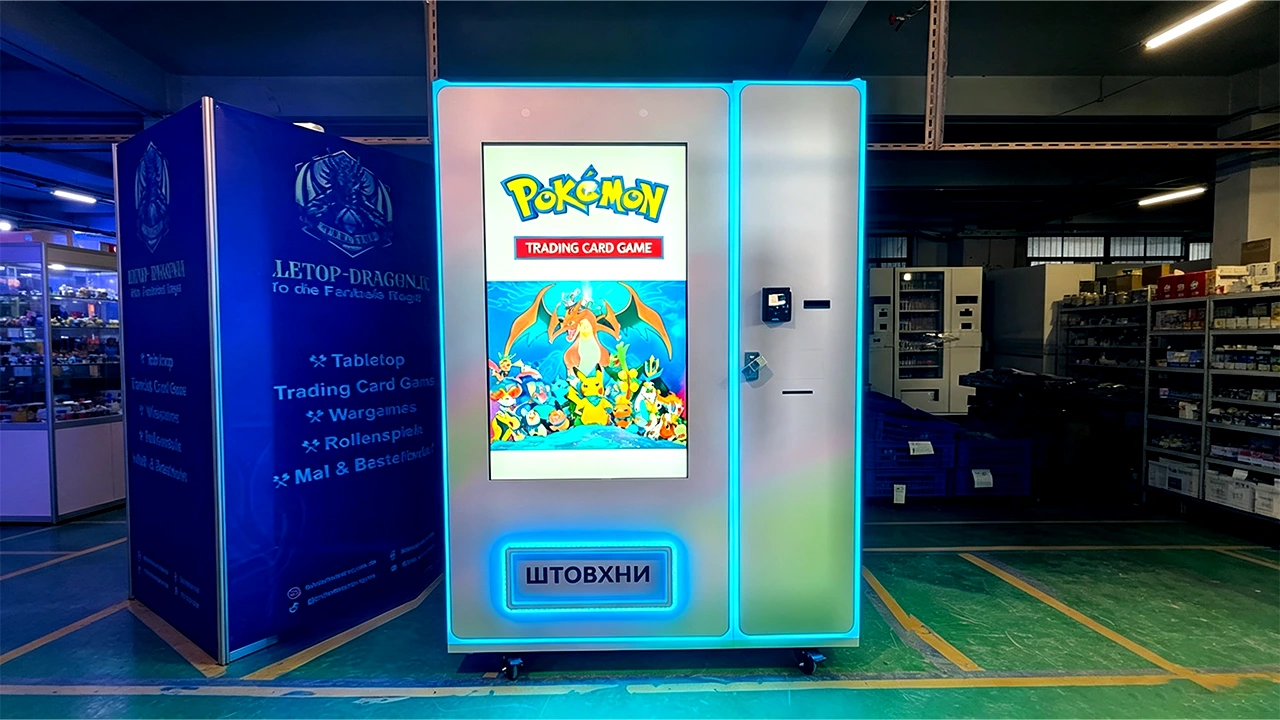
There are three main ways to run a card vending machine. You can operate it yourself, you can place it in a location under a revenue share agreement, or you can lease the machine to a third party. Each model has trade-offs.
Self-operation gives you full control over pricing, inventory, and maintenance. You keep all the revenue, but you also take on all the risk and workload. This is the model I prefer because I like to know exactly what is happening with my machines.
Revenue share is common in card shops. You place the machine in the store, and the store owner takes a percentage of sales, usually between 10% and 20%. This reduces your rent cost, but you still handle all the maintenance and restocking. Make sure the revenue share agreement is in writing and covers what happens if the store changes ownership or closes.
Leasing is the most passive option. You rent the machine to a business owner for a fixed monthly fee. You are essentially becoming a financier. The problem is that if the lessee does not maintain the machine or fails to promote it, your machine sits idle. I have seen this happen too often.
Here is a quick comparison based on my experience:
| Model | Upfront Cost | Monthly Effort | Revenue Potential | Risk Level |
|---|---|---|---|---|
| Self-operate | High (machine + inventory) | High (restock, maintenance, data review) | Highest (keep all revenue) | Medium |
| Revenue share | Medium (machine + inventory) | Medium (restock, maintenance) | Medium (share with host) | Low to Medium |
| Lease | Low (machine only) | Low (collection and occasional check) | Fixed monthly fee | Low |
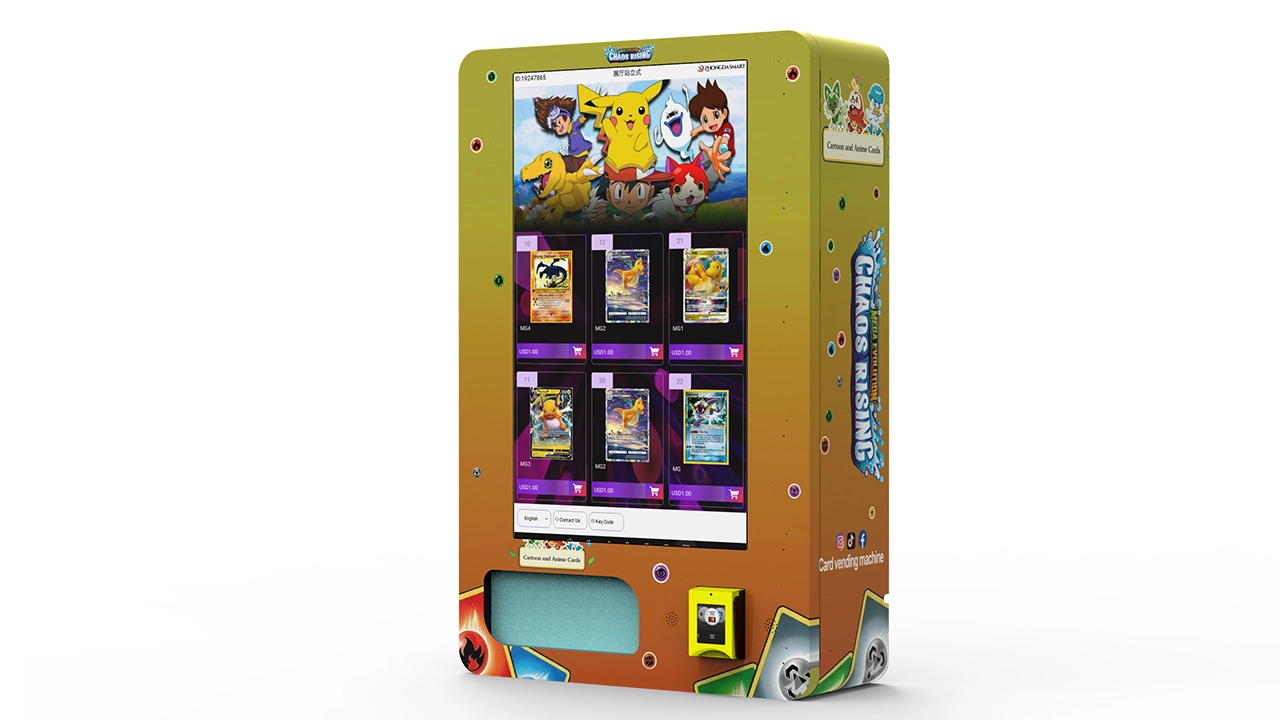
If you are new, I recommend starting with a revenue share arrangement in a single location. It limits your downside and lets you learn the operational side without overcommitting your time.
Restocking and Inventory Management
Restocking is where most operators lose money. If you overstock, your cash is tied up in inventory that may not sell. If you understock, you miss sales. I have found that a data-driven approach works best.
Track your sales by product and by day of the week. In my experience, weekends account for 60% to 70% of weekly sales at card machines. I restock on Thursday or Friday morning to ensure the machine is full for the weekend rush. I also track which products sell out first and adjust my order quantities accordingly.
You also need to pay attention to product condition. Cards can get damaged if the dispensing mechanism is not properly calibrated. A bent corner or scratched surface will kill the resale value of a $30 card. I have had to write off damaged inventory, and that is a cost you need to factor into your margins.
Automated retail is not just about selling; it is about selling the right product at the right time. I use a simple spreadsheet to track my inventory turnover rate. If a product has not sold in 30 days, I replace it with something else. This is a simple rule, but it has saved me from carrying dead stock.
Maintenance and Repair: Expect the Unexpected
Every machine will break down eventually. The question is how fast you can respond. I have learned to keep a small kit of spare parts, including card feeders, sensors, and power supplies. This has saved me from weeks of downtime waiting for parts to ship.
Most common issues are easy to fix if you are willing to learn. Jams, sensor misalignment, and payment reader issues account for 80% of my repair calls. I have also learned to do basic vending machine repair myself, which has saved me hundreds of dollars in service fees.
However, some problems require professional help. If the touchscreen fails or the software crashes, you may need to contact the manufacturer. That is why I always choose suppliers with solid after-sales support. Zhongda Smart, for example, has a technical support team that responds within 24 hours, which is better than most competitors I have dealt with.
I also recommend setting aside a maintenance budget of at least $50 per month per machine. This covers minor repairs and replacement parts. Over a year, that is $600 per machine, which is a reasonable insurance policy.
Common Mistakes That Cost Me Thousands
I have made plenty of mistakes, and I want to share them so you do not repeat them. The biggest mistake was ignoring the importance of a reliable payment system. I placed a machine in a busy mall, but the card reader failed during the holiday season. I lost an estimated $1,500 in sales over two weeks.
The second mistake was overpaying for a location. I signed a lease with a fixed monthly rent of $300 plus 10% of sales. The location looked great on paper, but the foot traffic did not convert to buyers. I ended up paying rent for six months before I finally moved the machine.
The third mistake was not checking the machine regularly. I assumed that because the machine was automated, it did not need supervision. I went two weeks without checking, and when I finally did, I found that the card feeder had jammed on the first day. The machine had been out of service for 13 days, and I had no idea.
These mistakes taught me to be proactive. I now check my machines at least once a week, and I have remote monitoring set up on most of them. The remote monitoring system sends me alerts when the machine is offline or when a component fails. This has been a game-changer.
Data and Realistic Expectations
Let me give you some realistic numbers. Based on my operations, a well-placed card vending machine can generate between $500 and $1,500 in monthly revenue. After product costs, payment processing fees, and maintenance, the net profit is usually between $300 and $900 per month. That is not a fortune, but it is a solid side income if you have multiple machines.
According to a report from Statista, the vending machine market in the United States was valued at over $7 billion in recent years, with a steady annual growth rate. However, that growth is driven by traditional snack and beverage machines. Card machines are a smaller segment, so do not expect explosive growth overnight.
Your break-even period will depend on your initial investment and your monthly net profit. If you spend $10,000 on a machine and make $700 per month net, you will break even in about 14 months. If you make $1,200 per month, you break even in just over 8 months. These are realistic ranges based on my experience, not promises.
Legal and Compliance Considerations
You do not need a special license to operate a vending machine in most US states, but you do need a general business license. You also need to collect and remit sales tax, which varies by state and municipality. I recommend consulting a local accountant to make sure you are compliant.
In the European Union, the rules are stricter. You need to register your business, and you may need to comply with the EU's General Product Safety Directive. You also need to ensure that your machine meets local electrical and safety standards. Eurostat publishes data on retail and vending regulations across member states, which is a good starting point for research.
I also recommend getting liability insurance. If a customer claims they were injured by your machine, you need coverage. The cost is usually a few hundred dollars per year, which is cheap compared to the potential legal fees.
FAQ: Answers to the Questions I Get Asked Most
Are card vending machines profitable?
They can be, but profitability depends on location, product mix, and your operational discipline. In my experience, a well-managed machine in a good location can generate $300 to $900 in monthly net profit. A poorly placed machine will lose money.
How much does a card vending machine cost?
A new machine costs between $6,000 and $15,000. Used machines are cheaper, but they come with higher repair risks. I recommend budgeting at least $10,000 for your first machine, including initial inventory and installation.
How long does it take to break even?
With realistic net profits of $500 to $1,000 per month, you can expect to break even in 10 to 18 months. This varies based on your machine cost, location, and how quickly you learn to manage inventory and maintenance.
Should a beginner buy or lease a machine?
If you have the capital, buying is better in the long run because you keep all the revenue. If you want to minimize risk, start with a revenue share arrangement or lease a machine to learn the business before committing capital.
Where should I place a card vending machine?
Focus on locations where the target audience already exists: game stores, hobby shops, comic shops, malls, and college campuses. Avoid locations with high foot traffic but the wrong demographic.
What permits do I need?
In the US, you need a general business license and you must collect sales tax. In the EU, you need to register your business and comply with local safety standards. Check with your local government for specific requirements.
How do I choose a supplier?
Look for a supplier with existing customers in your region, a solid warranty, and responsive customer support. Ask for a live demo and test their technical support before purchasing.
What happens if the machine breaks down?
You need a maintenance plan. Keep spare parts on hand and learn basic repairs. For major issues, contact the manufacturer or a local technician. I recommend setting aside $50 per month per machine for maintenance.
How can I reduce restocking and maintenance costs?
Use data to track which products sell and restock only those items. Check your machines weekly to catch problems early. Invest in remote monitoring to get alerts when something goes wrong.
Final Thoughts
Card vending machines are a legitimate business, but they are not a lottery ticket. The operators who succeed are the ones who treat it like a real retail operation. They choose locations carefully, maintain their machines, and use data to make decisions.
If you are willing to put in the effort, the returns can be solid. If you are looking for a fully passive income stream, you will be disappointed. I have been in this industry for over a decade, and the machines that make money are the ones that are managed well.
Start small, learn the operational side, and scale only when you have a proven model. That is the approach that has worked for me, and it is the one I recommend to anyone who asks.