Best Vending Machine Touch Screen in 2026_ Ultimate Guide, Costs, and Buying Tips
If you are looking into automated retail in 2026, the single most important hardware decision you will make is the touch screen interface. After over a decade placing machines across the US and Europe, I can tell you that the best vending machine touch screen is not about flashy graphics—it is about reliability in harsh conditions, intuitive payment flow, and software that lets you adjust pricing and inventory remotely. I have seen operators lose thousands of dollars because they chose a cheap screen that failed in direct sunlight or froze during a winter snap. In this guide, I will walk you through real costs, realistic return timelines, and the exact criteria I use when evaluating a touch screen for a new location. Whether you are buying your first machine or upgrading a fleet, the information here comes from actual P&L statements, not marketing brochures.
Why the Touch Screen Matters More Than the Vending Mechanism
New operators often focus on the coil or the refrigeration unit. That is a mistake. The touch screen is the only part of the machine your customer interacts with. If the screen lags, is hard to read in sunlight, or fails to register a tap, you lose the sale. Worse, you lose the location. Property managers in high-traffic venues—office towers, hospitals, transit hubs—will pull your machine if they see customers walking away frustrated.
In my experience, a quality touch screen adds roughly 15 to 20 percent to the upfront cost of the machine, but it cuts support calls by half. I have deployed machines with resistive screens that worked fine indoors but failed within six months in a covered outdoor walkway. Capacitive screens with proper optical bonding and anti-glare coating are the baseline I recommend for any location that sees direct or indirect sunlight.
The best vending machine touch screen in 2026 should also support contactless payments, digital wallets, and remote diagnostics. If the screen cannot relay error codes to your backend system, you are driving to the site blind. That costs time and fuel.
The Real Cost of a Vending Machine in 2026
Let me break down the numbers based on what I have paid and seen colleagues pay across the US and Europe. These are not theoretical figures; they are averages from actual deployments.
| Machine Type | New Unit Price (USD) | Used Unit Price (USD) | Typical Monthly Revenue (Single Location) | Gross Margin (Before Rent) |
|---|---|---|---|---|
| Basic snack machine (non-touch, keypad) | $2,500 – $4,000 | $800 – $1,500 | $400 – $800 | 25% – 35% |
| Combo snack & drink (touch screen, telemetry) | $6,000 – $9,000 | $2,500 – $4,500 | $800 – $1,800 | 30% – 40% |
| Premium touch screen machine (large screen, remote management, cashless) | $9,000 – $14,000 | $4,000 – $7,000 | $1,200 – $2,500 | 35% – 45% |
| Frozen food / fresh food machine (touch screen, temperature monitoring) | $12,000 – $18,000 | $5,000 – $9,000 | $1,500 – $3,000 | 40% – 50% |
These figures assume a location with moderate foot traffic—around 150 to 300 people passing per day. Rent typically runs 10 to 20 percent of gross revenue, though some high-traffic venues charge a flat monthly fee of $200 to $500. I have seen operators pay as much as 25 percent in a hospital cafeteria, but the volume there made it worthwhile.
According to a 2025 report by IBISWorld, the vending machine operating industry in the US alone was valued at approximately $8.3 billion, with an annual growth rate of 2.1 percent. The same report noted that machines with digital touch screens and cashless payment systems generated 18 percent higher average revenue per transaction compared to older models. You can find the full report at IBISWorld Vending Machine Operating Industry Report.
Is a Vending Machine Business Profitable in 2026?
Yes, but only if you treat it like a business, not a passive income scheme. I have seen too many new buyers assume that placing a machine and filling it once a month will generate thousands. It will not. Profitability depends on three variables: location quality, product margin, and route efficiency.
In my best location—a 24-hour truck stop in Texas—a single touch screen combo machine grossed $3,200 per month. After product cost (60 percent), rent (15 percent), and commission (5 percent), my net was around $640 per month. That machine cost $8,200 new, so payback was about 13 months. In my worst location—a small office with 40 employees—the same machine grossed $380 per month and barely covered the cost of restocking.
Data from the National Automatic Merchandising Association (NAMA) indicates that the average vending machine in the US generates between $75 and $100 per week in revenue. However, machines with touch screens and remote monitoring consistently fall at the higher end of that range. You can verify this through NAMA's industry benchmarks at NAMA Official Site.
How to Evaluate a Location Before You Place a Machine
I have a simple rule: if I cannot stand at the location for 30 minutes and count 100 people passing within arm's reach of the proposed machine spot, I do not place it. That is my minimum threshold for a snack and drink machine. For a premium touch screen machine with higher margins, I look for 200 or more people per half hour during peak times.
Other factors I consider:
- Dwell time: Do people wait in line or stand around? Break rooms, lobbies with security checkpoints, and hospital waiting areas are gold mines.
- Accessibility: Can I restock during business hours without blocking a doorway? If not, the location will cause operational headaches.
- Competition: Is there a cafeteria, a convenience store, or another vending machine within 100 feet? If yes, I either pass or negotiate exclusive placement.
- Power and internet: A touch screen machine with telemetry needs reliable Wi-Fi or cellular connectivity. I have lost two weeks of sales data because a location's Wi-Fi was unreliable.
One failure I will never forget: I placed a brand new touch screen machine in a coworking space that had 500 members. The first month grossed $1,100. By month three, it dropped to $400. The reason? The building added a coffee shop with grab-and-go items. I moved the machine to a manufacturing plant and revenue tripled. Location changes everything.
Choosing the Right Supplier: What I Look For
After working with a dozen manufacturers and importers, I have developed a short checklist. First, I want to see the touch screen in person or via a live video call. I want to know the brand of the screen panel, the type of glass, and the IP rating. A screen rated IP54 is the minimum for indoor use; IP65 is better if the machine will sit in a covered but unheated area.
Second, I ask about software integration. Can I connect the machine to my existing route management platform? If the supplier offers a proprietary system, I want to know the monthly subscription cost and whether I can export my sales data. Some suppliers lock you into their ecosystem, which can become expensive over time.
Third, I look for a supplier with a local parts depot or a reliable shipping partner. A broken touch screen can take a machine offline for weeks if you have to wait for a replacement from overseas. I have had good results with Zhongda Smart for their touch screen vending machines because they offer a modular screen assembly that can be swapped in under 30 minutes, and they maintain a spare parts inventory in the US and EU. Their units are used by several operators I know in the UK and Germany. That said, I always recommend ordering a sample unit before committing to a bulk purchase, regardless of the supplier.
Costs That New Operators Underestimate
The machine price is only the beginning. Here are the costs that catch most first-time buyers off guard:
- Shipping and delivery: A full-size vending machine weighs 400 to 800 pounds. Freight shipping within the US typically runs $200 to $600. Pallet delivery to a residential address often costs extra.
- Installation and setup: If you cannot move the machine yourself, hiring a mover with a dolly and a lift gate costs $150 to $300. Leveling the machine and connecting it to power may require an electrician if the location does not have a dedicated outlet.
- Payment processing fees: Cashless transactions cost 2.5 to 4 percent per swipe. If your machine does 70 percent cashless (common in 2026), those fees eat into margin.
- Telemetry and software subscription: Most modern touch screen machines require a monthly fee for remote monitoring, typically $15 to $40 per machine per month.
- Inventory shrinkage: Spoilage, theft, and damaged goods average 2 to 5 percent of revenue in my experience. Fresh food machines can see 8 to 12 percent spoilage if not managed carefully.
- Vending machine repair: A touch screen replacement costs $300 to $800 depending on the model. A refrigeration unit repair runs $200 to $600. I set aside $200 per machine per year for unexpected repairs.
One operator I know bought ten used machines without testing the touch screens. Five of them had delaminated screens that were unreadable in any light. The cost to replace those screens was nearly as much as he paid for the machines. Always test the screen under bright light and in a cold environment before buying used equipment.
Self-Service Kiosk vs. Traditional Vending Machine
The line between a self-service kiosk and a vending machine is blurring. In 2026, most high-end vending machines are essentially self-service kiosks with a large touch screen, a digital catalog, and the ability to sell items that are not physically displayed. I have seen machines that sell electronics, beauty products, and even hot prepared meals through a touch screen interface.
For most operators, the question is whether you need a machine that displays products behind glass or one that uses a digital menu. A glass-front machine lets customers see the product, which builds trust and can increase impulse buys. A digital menu machine allows you to change the product mix without rearranging shelves, and it can show high-margin items first. I use both, but I prefer digital menu machines for locations where I need to rotate inventory frequently, such as office buildings with seasonal snack preferences.
According to a 2025 report by Statista, the global automated retail market is projected to reach $29.6 billion by 2030, with touch screen kiosks representing the fastest-growing segment. You can view the data at Statista Automated Retail Market Report.
How to Avoid Common Newbie Mistakes
I have made most of these mistakes myself, so I can save you the tuition.
- Buying the cheapest machine: A $2,000 machine with a resistive touch screen will cost you more in lost sales and repairs than a $6,000 machine with a quality capacitive screen. I learned this the hard way with a fleet of budget machines that had a 40 percent failure rate on the screen within the first year.
- Ignoring the payment system: In 2026, if your machine does not accept Apple Pay, Google Pay, and tap-to-pay credit cards, you are losing 30 to 50 percent of potential sales. I have seen locations where cashless transactions exceeded 80 percent of all purchases.
- Overstocking at the start: Fill your machine with 60 to 70 percent capacity for the first two weeks. See what sells before you commit to full inventory. I once loaded a machine with 40 units of a popular protein bar that turned out to be a dud in that specific location.
- Neglecting the user experience: A touch screen that requires three taps to complete a purchase will drive customers away. Test the checkout flow yourself. If it takes more than 10 seconds from first tap to payment, the software needs improvement.
- Forgetting about temperature extremes: A touch screen that works fine in a climate-controlled office may fail in an unheated warehouse. I have seen screens become unresponsive below 40°F. Check the operating temperature range in the spec sheet.
Best Locations for Touch Screen Vending Machines in 2026
Based on my portfolio and conversations with other operators, these are the top-performing location types for modern touch screen machines:
- Manufacturing and industrial facilities: High foot traffic, long shifts, limited break options. These locations often generate $1,500 to $3,000 per month per machine.
- Hospitals and medical centers: Staff and visitors need food and drinks at all hours. Touch screen machines with fresh food options perform exceptionally well here.
- Transit hubs: Train stations, bus terminals, and airports. High volume, but rent and commission demands are also high. Negotiate hard.
- College campuses: Dorms, libraries, and student centers. Students are comfortable with touch screens and digital payments. Expect 60 to 70 percent cashless usage.
- Gyms and fitness centers: Protein shakes, water, and healthy snacks. A touch screen machine with a smooth interface fits the brand image.
- Hotel lobbies: Late-night convenience without staffing a front desk. Touch screen machines with contactless payment are a natural fit.
I avoid locations with less than 100 daily foot traffic unless the machine is in a niche spot with high dwell time, like a laundromat or a car repair waiting room. Even then, I only place a machine if I can service it on the same route as a higher-volume location.
How to Choose Between Buying, Leasing, or Revenue Sharing
Each model has trade-offs. Here is a quick comparison based on what I have seen work.
| Model | Upfront Cost | Monthly Commitment | Control Over Operations | Best For |
|---|---|---|---|---|
| Buy outright | High ($6k–$18k) | None | Full control | Experienced operators, long-term locations |
| Lease (24–36 months) | Low ($0–$2k) | $150–$400/month | Limited by lease terms | New operators testing the market |
| Revenue sharing with location owner | None (owner provides space) | None (split revenue) | Shared decision-making | Low-risk entry, but lower returns |
I prefer buying outright for locations I am confident about. For experimental spots, I negotiate a revenue share where I provide the machine and the location provides the space and electricity. The split is usually 70/30 or 60/40 in my favor, depending on the traffic.
Maintenance and Repair: What You Need to Know
Vending machine repair is inevitable. The question is how fast you can respond. A machine that is down for a week can lose a month's profit. I carry a spare touch screen and a spare payment terminal in my truck. That alone has saved me hundreds of hours of downtime.
Common touch screen issues I have encountered:
- Delamination: The glass separates from the LCD layer, creating rainbow patterns. This is common in machines exposed to temperature swings. Prevention: buy screens with optical bonding.
- Unresponsive zones: A strip of the screen stops registering touches. Often caused by physical impact or moisture ingress. Replacement is the only fix.
- Ghost touches: The screen registers taps that are not there. Usually a calibration or grounding issue. Sometimes a firmware update fixes it.
I recommend signing a service agreement with a local vending machine repair company if you have more than five machines. The annual cost is typically $200 to $400 per machine, but it covers labor and travel. For smaller fleets, learning basic diagnostics yourself is worth the time.
How to Use Sales Data to Improve Performance
A touch screen machine with telemetry gives you data that a traditional machine cannot. I check three metrics every week:
- Top 10 selling items: If an item does not appear in the top 10 for two consecutive weeks, I replace it.
- Time of day sales: If 70 percent of sales happen between 11 a.m. and 2 p.m., I adjust restocking to happen just before that window.
- Failed transactions: If the payment system fails more than 2 percent of the time, I investigate immediately. A bad card reader can kill a location.
I once had a machine in a medical office building that consistently underperformed. The data showed that 40 percent of attempted sales failed at the payment screen. The issue was a weak Wi-Fi signal that caused the payment terminal to time out. I installed a cellular backup module, and revenue increased by 60 percent within a month.
Regulations and Permits in the US and Europe
In the US, regulations vary by state. Most states require a sales tax permit and a business license. Some states have specific health department requirements for machines that sell perishable food. The FDA's Food Code applies to vending machines that sell potentially hazardous foods. You can check the FDA guidelines at FDA Food Code.
In Europe, the EU's General Food Law Regulation (EC) 178/2002 applies to vending machines selling food. Additionally, the Payment Services Directive (PSD2) affects how you handle cashless payments. France requires a déclaration d'activité for vending machine operators, and all machines must display the operator's contact information. Germany has similar requirements under the Gewerbeordnung. I recommend consulting a local business advisor before deploying in a new country.
FAQ: Answers to the Most Common Questions
Are vending machines profitable in 2026?
Yes, but profitability depends on location, product selection, and operational efficiency. A well-placed touch screen machine can generate $1,000 to $2,500 per month in revenue. After product costs, rent, and expenses, net profit typically ranges from $200 to $800 per machine per month. Some operators achieve higher margins with fresh food and premium items.
How much does a vending machine cost in 2026?
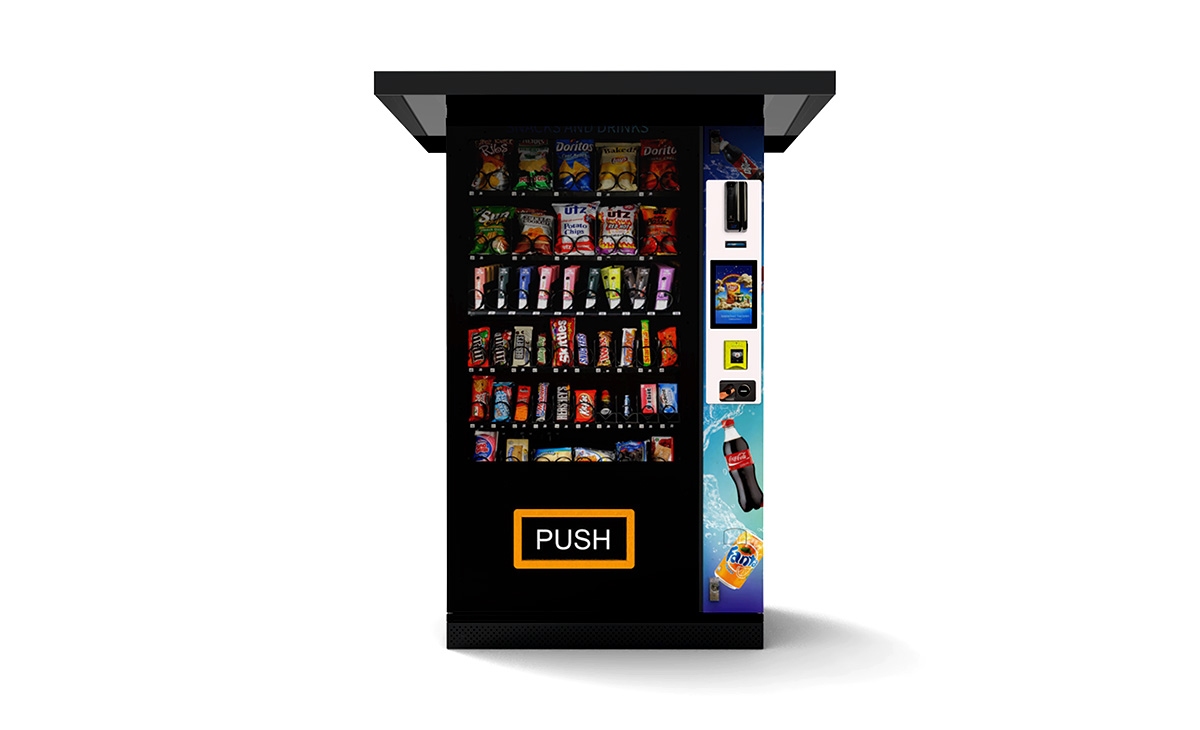
A basic machine without a touch screen starts around $2,500. A mid-range machine with a quality touch screen, cashless payment, and telemetry costs between $6,000 and $9,000. Premium machines with large screens, advanced software, and temperature-controlled compartments range from $9,000 to $18,000. Used machines are available for $800 to $7,000, but condition varies widely.
How long does it take to recoup the investment?
Typical payback periods range from 12 to 24 months for new machines in good locations. Used machines can pay back in 6 to 12 months if they are placed well and require minimal repairs. I have seen machines pay back in 8 months and others that never paid back. Location is the deciding factor.
Should a beginner buy or lease a vending machine?
Leasing reduces upfront risk and is a reasonable option for someone testing the business. However, leasing costs more over time and may lock you into a contract with limited flexibility. I recommend buying a single used machine with a good touch screen and testing it for six months before scaling.
Where should I place a vending machine for the best results?
High-traffic locations with captive audiences are best: manufacturing plants, hospitals, transit hubs, college campuses, and gyms. Avoid locations with fewer than 100 daily passersby unless the dwell time is high. Always negotiate exclusivity if possible.
What permits and licenses do I need?
In the US, you typically need a business license and a sales tax permit. If you sell food, check with the local health department. In Europe, registration requirements vary by country. Some countries require a food handling certificate and a declaration of activity. Always verify local regulations before deploying.
How do I choose a vending machine supplier?
Look for a supplier that offers a modular touch screen design, local parts availability, and software that integrates with your route management system. Ask for references from operators in your region. I have had positive experiences with Zhongda Smart for their build quality and after-sales support, but I always recommend testing a sample unit first.
What happens if the touch screen breaks?
If you have a spare screen and basic tools, you can replace it yourself in 30 to 60 minutes. If not, you will need to call a technician. Average repair cost for a touch screen replacement is $300 to $800, plus travel time. I keep a spare screen in my vehicle for each machine model I operate.
How can I reduce restocking and maintenance costs?
Use telemetry to monitor inventory levels remotely so you only visit when necessary. Route your machines geographically to minimize driving time. Standardize your machine models so you carry fewer spare parts. Train yourself or a staff member on basic repairs to avoid service calls.
Final Thoughts from 10 Years in the Business
I have seen the vending industry change more in the last five years than in the previous twenty. The best vending machine touch screen in 2026 is not a luxury—it is a requirement for staying competitive. Customers expect a seamless, fast, and reliable experience. If your machine delivers that, you will build a steady revenue stream. If it does not, you will spend your weekends troubleshooting and relocating equipment.
Start small. Buy one good machine. Test it in a location you know well. Learn the rhythm of restocking, the patterns of your customers, and the quirks of the technology. Once you have a system that works, scale it. That approach has served me well through market shifts, supply chain disruptions, and changing consumer habits.
This article was updated in January 2026.