After spending over a decade placing, servicing, and pulling machines out of bad locations across the US and Europe, I can tell you that the single most common question I get from new operators is about how to put a vending machine in service mode. It sounds like a technical hurdle, but in reality, it is often the first step toward understanding whether your machine is set up for profit or for constant headaches. Service mode is not just a maintenance tool—it is a diagnostic window into your entire automated retail operation. If you cannot confidently navigate this function, you will waste time, money, and inventory. Let me walk you through everything I have learned, not from a manual, but from real machines, real locations, and real mistakes.
What Service Mode Actually Means in Vending Operations
In the vending world, service mode is the operator-facing interface that lets you perform tasks like loading products, setting prices, testing motors, and collecting sales data. It is distinct from the customer-facing purchase screen. When you switch a machine into service mode, the payment system is disabled, and you gain access to the internal menu. This is where you troubleshoot, configure, and maintain the machine.
Every manufacturer has a slightly different way to access this mode. Some require a key switch inside the door, others use a combination of buttons on the keypad. I have seen operators struggle for hours because they did not know the specific sequence for their model. If you are working with a machine from Zhongda Smart, for example, the service mode is typically accessed by holding the "Select" button for five seconds while the door is open. It sounds simple, but I have seen brand new operators accidentally lock themselves out of the menu by pressing the wrong sequence.
Service mode is also where you check for error codes. If a motor is jammed or a sensor is blocked, the machine will log it here. Ignoring these codes is the fastest way to lose money. I once had a machine in a busy office building that was showing a "motor stalled" error for three weeks. The operator kept clearing it without investigating. Eventually, the entire column stopped working, and we lost three weeks of sales from that slot. That is a classic rookie mistake.
Why Knowing Service Mode Matters for Your Bottom Line
Understanding how to put a vending machine in service mode directly affects your operational efficiency. If you are spending 30 minutes per machine just trying to figure out how to load a product or change a price, you are bleeding time. Time is money in this business. A well-trained operator can service a machine in under ten minutes. That includes checking inventory, cleaning the glass, collecting cash, and reviewing sales data. All of that starts with entering service mode quickly and correctly.
I have also seen operators who never use service mode to analyze sales trends. They just refill the same products week after week. That is a missed opportunity. In service mode, most modern machines allow you to view sales by column over a specific period. You can see which items are selling fast and which are sitting for months. This data is gold. It tells you when to rotate inventory, when to adjust pricing, and when to consider moving the machine to a better location.
From a financial perspective, the cost of not knowing service mode is higher than you think. Let us say you have ten machines. Each machine requires a weekly visit. If you waste 20 minutes per visit because you are fumbling with the interface, that is over 170 hours per year lost. At a conservative labor rate of $20 per hour, that is $3,400 in wasted labor annually. That is not a small number for a small operator.
Step-by-Step: How to Put a Vending Machine in Service Mode
While the exact sequence varies by brand, the general process is consistent across most modern machines. Here is the standard method I use and teach to new operators.
1. Open the Main Door and Locate the Service Switch
Most machines have a physical toggle switch or a magnetic reed switch near the control board. On older models, this is a key-operated switch. Turn it to the "Service" or "Program" position. On newer machines, you might need to press a combination of buttons on the keypad. For example, on many models from Zhongda Smart, you press and hold the "Menu" button for three seconds until the screen displays "Service Mode."
2. Confirm the Payment System Is Disabled
Once in service mode, the bill validator and coin mechanism should be deactivated. If you see the payment screen still active, you have not entered service mode correctly. This is a safety feature to prevent customers from inserting money while you are working inside the machine.
3. Navigate the Menu Using the Keypad
Use the selection buttons to scroll through options. Common menu items include "Inventory," "Pricing," "Test Motors," "Sales Reports," and "Error Log." Each manufacturer uses slightly different terminology, but the logic is the same. If you are unsure, check the manual. I always keep a PDF of the manual on my phone for each machine model I operate.
4. Perform Your Tasks
Whether you are loading products, setting prices, or testing a motor, do it methodically. I recommend doing one task at a time. For example, if you are testing motors, run each column individually and listen for the sound of the spiral turning. If you hear a grinding noise, that motor is likely worn out and needs replacement.
5. Exit Service Mode Properly
When you are done, exit service mode by toggling the switch back to "Operate" or pressing the exit button on the menu. Close the door and test the machine by making a small purchase. I always buy a cheap item like a pack of gum to confirm the payment system is working and the machine is dispensing correctly.
Common Mistakes When Using Service Mode
I have seen operators make the same mistakes year after year. Here are the most common ones, along with how to avoid them.
Mistake 1: Not checking error codes. Many operators clear error codes without understanding the root cause. If a motor is stalling, it might be because the product is too heavy, the spiral is bent, or the motor gearbox is failing. Clearing the code without fixing the issue will just cause a repeat failure.
Mistake 2: Changing prices without testing. I have seen operators set prices in service mode, exit, and then discover that the machine is charging the wrong amount. Always test a purchase after making price changes. It takes 30 seconds and saves you from customer complaints.
Mistake 3: Forgetting to disable service mode before closing. If you leave the machine in service mode, the payment system will not work. Customers will walk away frustrated. I have lost sales because of this simple oversight. Now I always double-check the screen before closing the door.
Mistake 4: Ignoring the sales data. Service mode provides a wealth of information. If you are not reviewing sales by column, you are operating blind. I recommend downloading or writing down the sales data every visit. Over time, you will see patterns that inform your restocking and pricing strategy.
Equipment Considerations: What to Look for in a Machine
Not all vending machines are created equal. The ease of entering service mode, the quality of the interface, and the reliability of the components vary widely. Based on my experience, here are the key factors to evaluate when choosing a machine.
User Interface. A machine with a clear, intuitive menu makes service mode much easier. Look for a machine with a backlit LCD screen and simple navigation buttons. Some budget machines use cryptic codes and require a manual to understand. Avoid those unless you have a lot of time to waste.
Build Quality. The service mode switch and the control board are often the first things to fail on cheap machines. I have seen machines where the service mode switch broke after six months. That means you cannot access the menu without replacing the switch. Zhongda Smart machines are known for robust control boards that last for years. I have several in the field that are over five years old with no issues.
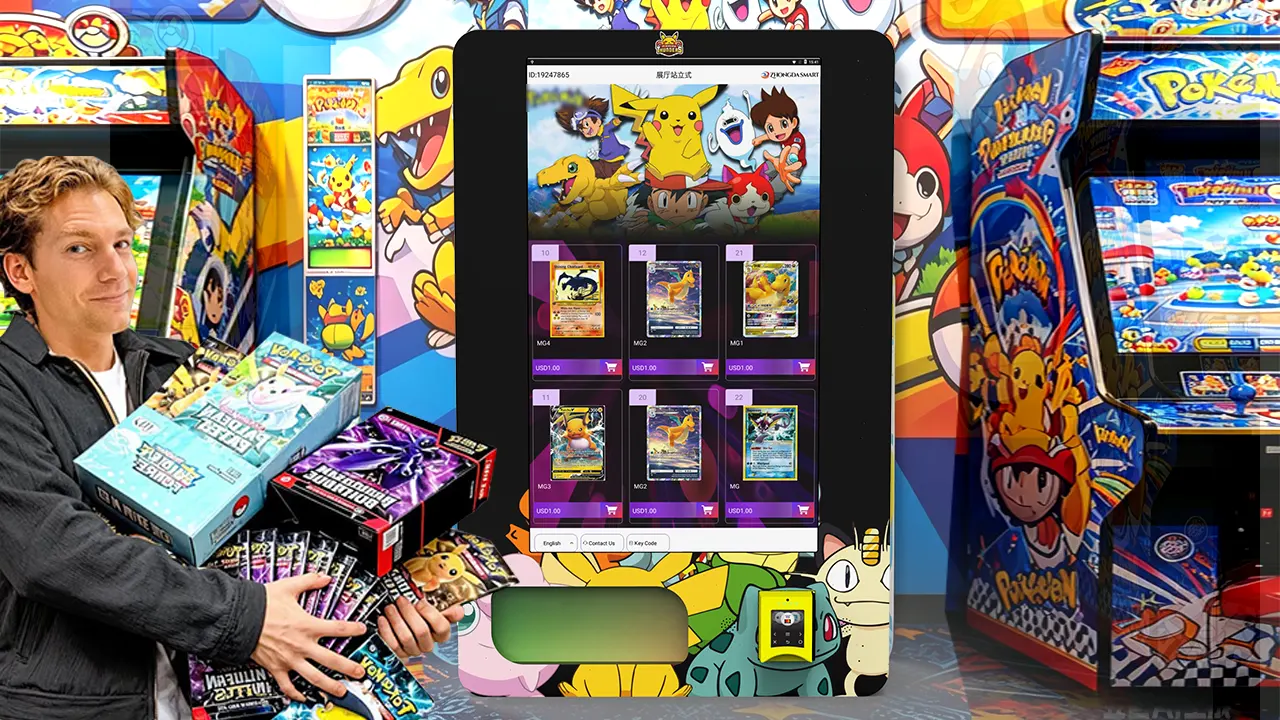
Remote Access. Some modern machines allow you to enter service mode remotely via a smartphone app or web portal. This is a game-changer for operators with multiple locations. You can check inventory, adjust prices, and even reset errors without driving to the site. If you are scaling your operation, invest in machines with telemetry capabilities.
Spare Parts Availability. When you need to repair a machine, you do not want to wait weeks for a part. Choose a manufacturer that stocks common parts like motors, control boards, and service switches. I recommend asking your supplier about lead times before you buy. A machine that is down for three weeks is a machine that is losing you money.
Cost and Return on Investment: What the Numbers Look Like
I have compiled a simple table based on my own operational data and industry benchmarks. These figures are estimates and will vary based on location, product mix, and maintenance practices. But they give you a realistic starting point.
| Machine Type | Initial Investment (USD) | Monthly Revenue (Avg) | Gross Margin | Monthly Operating Cost | Typical Payback Period |
|---|---|---|---|---|---|
| Basic snack machine | $2,000 - $4,000 | $400 - $800 | 40% - 50% | $100 - $200 | 12 - 18 months |
| Combo snack and drink | $4,000 - $7,000 | $800 - $1,500 | 45% - 55% | $200 - $300 | 12 - 24 months |
| High-end with touchscreen | $7,000 - $12,000 | $1,200 - $2,500 | 50% - 60% | $300 - $500 | 18 - 30 months |
| Refrigerated food machine | $5,000 - $10,000 | $1,000 - $2,000 | 50% - 60% | $250 - $400 | 15 - 24 months |
According to a 2023 report from IBISWorld, the vending machine industry in the United States generates approximately $8 billion in annual revenue, with an average profit margin of around 15% after all expenses. The same report notes that the number of vending machines in operation has stabilized after a decline during the pandemic, with a slight uptick in 2022 and 2023. You can find the full report at IBISWorld Vending Machine Operators Industry Report.
Another useful data point comes from Statista, which reported that the average vending machine in the US generates about $75 to $100 in weekly sales, depending on location. High-traffic locations like hospitals and transportation hubs can exceed $200 per week. You can access their data at Statista Vending Machines Topic Page.
In Europe, the market is slightly different. According to the European Vending & Coffee Service Association (EVA), the total number of vending machines in Europe is around 4.2 million, with an average annual turnover per machine of €3,500 to €5,000. Their data is available at European Vending & Coffee Service Association.
How to Evaluate a Location for Vending Machine Placement
Location is the single most important factor in vending profitability. I have placed machines in what looked like high-traffic areas and failed, and I have put machines in quiet spots that performed well. Here is what I look for.
Foot Traffic vs. Dwell Time. High foot traffic is great, but dwell time is even better. A busy train station might have thousands of people passing through, but if they are rushing to catch a train, they are less likely to stop and buy. A break room in a factory, where employees have a 15-minute break, often generates higher sales per visitor. I have a machine in a small manufacturing plant with only 50 employees that does $1,000 per month because they have consistent dwell time.
Competition. Check if there are other vending machines nearby. If there is already a machine selling the same products, you will split the market. I once placed a snack machine next to a competitor's drink machine. It worked well because we complemented each other. But placing a snack machine next to another snack machine is a recipe for low sales.
Accessibility. The machine needs to be easy to service. If you have to park a block away and carry heavy coin boxes and product cases, you will hate that location. I have walked away from otherwise good locations because the loading dock was too far from the machine.
Security. Machines in areas with high crime rates get vandalized. I have had machines broken into, windows smashed, and control boards stolen. Always check the local crime statistics. A machine that costs $4,000 is not worth placing in a location where it will be destroyed in six months.
Lease Terms. Some locations ask for a commission on sales. Typical commissions range from 10% to 25% of gross revenue. If a location demands a high commission, make sure the traffic justifies it. I have seen operators accept 30% commissions and still make money because the volume was high enough. But for most locations, 15% is the sweet spot.
Choosing a Supplier: What to Look For
When I started, I bought the cheapest machines I could find. That was a mistake. The machines broke down constantly, and parts were hard to get. Over time, I learned to prioritize reliability and support over price. Here is my checklist for evaluating a vending machine supplier.
Warranty and Support. A good supplier offers at least a one-year warranty on parts and labor. They should also have a technical support hotline that is staffed during business hours. I have called support at 6 p.m. on a Friday and gotten a live person who walked me through a repair. That is worth more than a $500 discount on the machine price.
Parts Availability. Ask about lead times for common parts. If they say "two to three weeks," that is a red flag. A good supplier stocks motors, control boards, and service switches. I recommend asking for a list of spare parts they keep in stock.
Customization Options. Some locations require specific machine configurations, such as a specific payment system or a custom color. A supplier that offers customization can help you win contracts that other operators cannot touch. Zhongda Smart, for example, offers a range of configurations including cashless payment systems and remote monitoring. I have used their machines in several locations and found the customization process straightforward.
References. Ask for references from other operators. Call them and ask about their experience with the supplier. I have saved myself from bad purchases by talking to other operators who warned me about poor build quality or slow support.
Common Pitfalls for New Operators
I have made almost every mistake in the book, so let me save you some trouble.
Pitfall 1: Buying too many machines too fast. I started with one machine, then bought five more within three months. I ended up with machines in bad locations because I was rushing. Start with one or two machines, learn the ropes, and then scale.
Pitfall 2: Ignoring maintenance. A machine that is not cleaned and serviced regularly will break down more often. I have seen machines that were so dirty that the coin mech stopped working because of dust buildup. Schedule regular cleaning and inspection.
Pitfall 3: Overpaying for locations. Some location owners will try to charge you a high commission or a monthly fee. Do not agree to terms that do not make financial sense. Use a simple spreadsheet to calculate your break-even point. If the location cannot generate enough sales to cover costs, walk away.
Pitfall 4: Not testing the machine before placing it. I once placed a machine that had a faulty temperature sensor. The drinks were not cold enough, and customers stopped buying. I lost two weeks of sales before I figured out the problem. Always run a full test cycle before you leave a machine on site.
How to Use Sales Data to Improve Performance
The data you collect in service mode is your most valuable asset. Here is how I use it.
Identify slow movers. If a product has not sold in four weeks, replace it with something else. I have a rule: if it does not sell in three months, it gets pulled. I have found that local snack brands often outperform national brands in certain areas.
Adjust pricing dynamically. If a product is selling out every week, you are probably undercharging. Raise the price by 10% and see if sales hold. If they drop, you can always lower it back. I have done this with energy drinks and saw a 15% revenue increase without losing volume.
Rotate inventory seasonally. In summer, cold drinks sell better. In winter, hot chocolate and soup cups do well. Adjust your product mix based on the season. I have a machine in a ski resort that sells three times more hot chocolate in January than in July.
Track machine performance over time. If a machine's sales are declining, it might be time to move it. I have a spreadsheet that tracks monthly revenue for each machine. If a machine drops below my minimum threshold for three consecutive months, I consider relocating it.
FAQ: Frequently Asked Questions About Vending Machine Service Mode and Operations
How do I put a vending machine in service mode?
The process varies by brand, but generally, you open the main door and locate a service switch or press a combination of buttons on the keypad. For most modern machines, holding down a "Menu" or "Select" button for a few seconds will bring up the service menu. Always consult your machine's manual for the exact sequence.
Are vending machines profitable?
Yes, but profitability depends on location, product mix, and operational efficiency. A well-placed machine can generate $400 to $2,500 per month in revenue, with gross margins between 40% and 60%. After expenses, net profit typically ranges from 10% to 20% of revenue. According to IBISWorld, the industry average profit margin is around 15%.
How much does a vending machine cost?
Basic snack machines start around $2,000 used or $3,000 new. Combo machines that sell both snacks and drinks range from $4,000 to $7,000. High-end machines with touchscreens and telemetry can cost $7,000 to $12,000 or more. Shipping and installation add another $200 to $500.
How long does it take to recoup the investment?
Payback periods typically range from 12 to 30 months, depending on the machine cost and location performance. A machine in a high-traffic location with good margins can pay for itself in under a year. A machine in a marginal location might take two years or more.
Should a beginner buy or lease a vending machine?
Buying is usually better for long-term profitability. Leasing can be a good option if you want to test the waters without a large upfront investment, but lease terms often include high monthly fees that eat into your profits. I recommend buying a used machine from a reputable supplier to start.
Where should I place a vending machine?
Look for locations with consistent foot traffic and dwell time. Good options include office break rooms, factory floors, hospitals, schools, gyms, and transportation hubs. Avoid locations with low traffic, high crime, or existing competition selling the same products.
What permits or licenses do I need?
Requirements vary by city and state. In the US, you typically need a business license and a sales tax permit. Some cities require a vending machine permit. In Europe, you may need a business registration and compliance with local food safety regulations. Check with your local government offices before placing any machines.
How do I choose a vending machine supplier?
Look for a supplier with a solid warranty, good technical support, and readily available spare parts. Ask for references and check online reviews. I have had good experiences with Zhongda Smart for their reliable machines and responsive support team.
What happens if my vending machine breaks down?
First, check the error log in service mode to identify the issue. Common problems include jammed motors, faulty sensors, or payment system failures. If you cannot fix it yourself, contact your supplier or a local vending machine repair technician. Keep a stock of common spare parts to minimize downtime.
How can I reduce maintenance costs?
Preventive maintenance is key. Clean the machine regularly, check for loose wires, and test all motors and sensors during each visit. Invest in machines with robust components that are less likely to fail. Also, consider machines with remote monitoring capabilities so you can diagnose issues without driving to the location.
Final Thoughts from an Operator
Running a vending machine business is not a get-rich-quick scheme. It requires attention to detail, a willingness to learn from mistakes, and a good understanding of your equipment. Knowing how to put a vending machine in service mode is just the beginning. Once you master that, you can start using the data to make smarter decisions about pricing, inventory, and location selection.
I have seen operators succeed by being methodical. They track their numbers, maintain their machines, and build relationships with location owners. I have also seen operators fail because they treated it as a passive income stream. It is not passive. It is active, hands-on work that pays off when done right.
If you are just starting, take your time. Buy one machine, learn every function, including service mode, and prove the model works before you scale. The vending industry has been around for decades and will continue to evolve. With the right approach, you can build a profitable operation that lasts.
- online service