Cashless Payment Systems For Vending Machines_ Prices, Profit Potential, and Setup Guide for Beginne
If you are looking into vending machines as a business, the first real question is not about which machine to buy—it is about how you get paid. I have spent over a decade placing machines across the United States and parts of Europe, and I can tell you that the shift to cashless payment systems for vending machines has completely changed the profitability landscape. A machine that only takes cash will miss out on roughly 40 to 60 percent of potential sales, depending on the location. In my experience, adding a card reader or a mobile payment option can increase revenue by 30 percent within the first month. This guide covers the real costs, the profit potential, and a practical setup process for beginners who want to enter the automated retail space without making expensive mistakes.
Why Cashless Payments Matter More Than You Think
When I started in this business, cash was king. But that changed faster than most operators expected. Today, customers expect to tap a card or use a digital wallet. If your machine cannot accept those payments, you are effectively turning away a large segment of potential buyers. I have seen locations where cashless payment systems for vending machines increased weekly sales from 200 dollars to over 600 dollars. That is not an outlier—it is the new normal.
The convenience factor is obvious, but there is a deeper layer. Cashless systems allow for remote monitoring, dynamic pricing, and detailed sales analytics. You can see exactly which products sell at what time of day. You can adjust prices without walking to the machine. You can even run promotions. This is the difference between operating a machine and running a business.
From a customer perspective, the expectation is simple: if they cannot pay with a card or phone, they will walk to the next machine or the nearest convenience store. In busy locations like office buildings, hospitals, and transit hubs, cashless is no longer a luxury—it is a requirement.
Understanding the Costs of Cashless Payment Systems
Let me break down the real numbers. A basic cashless payment system for a vending machine typically costs between 200 and 600 dollars for the hardware. That includes the card reader, the antenna for contactless payments, and the connectivity module. Some providers charge an upfront fee, while others offer the hardware at a discount if you sign a long-term processing agreement.
Transaction fees are the ongoing cost. Most processors charge between 2.5 percent and 5 percent per transaction, plus a small flat fee. For a 2-dollar snack, that might mean 10 to 20 cents in fees. That sounds small, but it adds up. On a machine doing 1,000 dollars in monthly sales, you could be paying 30 to 50 dollars in processing fees. You need to factor that into your margin calculations.
Connectivity is another cost. Some systems use cellular networks, which require a monthly data plan. Expect to pay 5 to 15 dollars per month per machine. Wi-Fi-based systems are cheaper, but they are only practical in locations with reliable, secure internet access. I have used both, and I prefer cellular for flexibility, especially when moving machines between locations.
Hardware Options and What to Look For
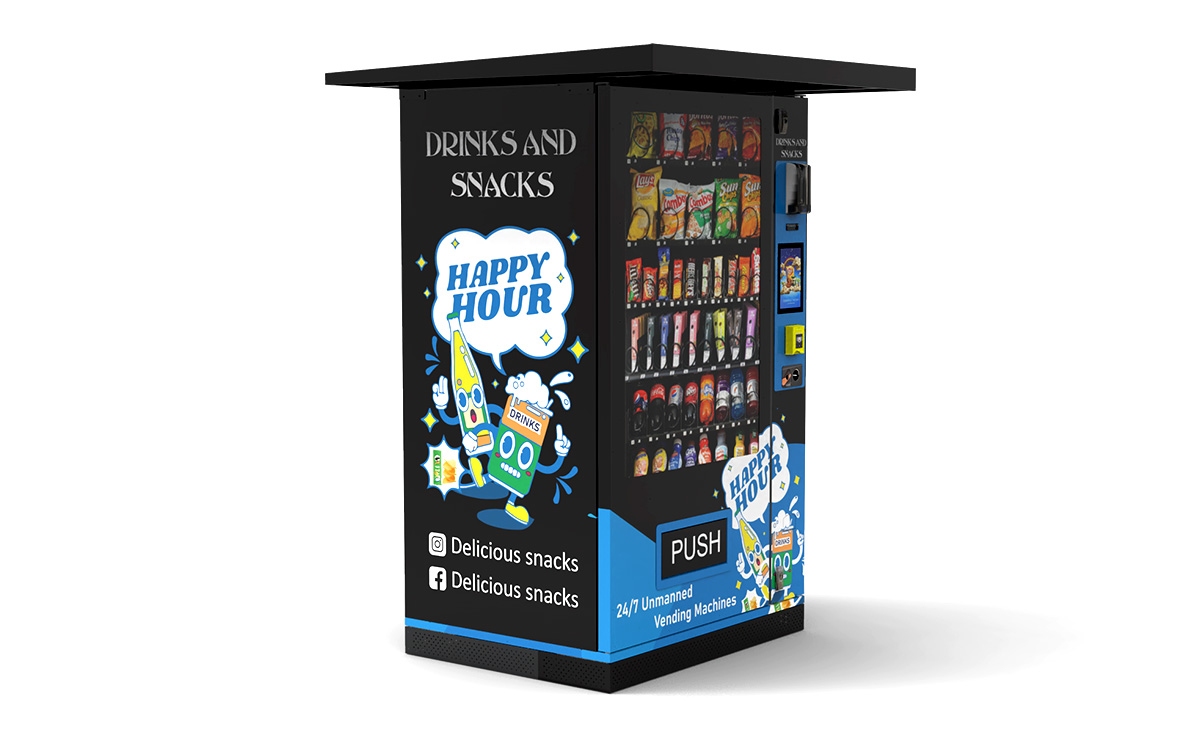
There are several types of cashless readers on the market. The most common are the ones that replace the existing coin slot or sit on top of the machine. You want a system that supports NFC (Near Field Communication) for tap-to-pay, as well as chip and magnetic stripe. Mobile wallet support, including Apple Pay and Google Pay, is essential.
Some systems come with a built-in screen that can display promotions or product images. That is nice, but not necessary for beginners. Focus on reliability and ease of integration. I have used systems from Nayax, Cantaloupe, and USA Technologies. All work well, but the key is compatibility with your vending machine's control board. Check with your machine supplier before buying anything.
Profit Potential: What You Can Realistically Expect
Profit margins in vending depend on three things: product cost, location foot traffic, and payment acceptance. I have machines that gross 1,500 dollars per month and machines that barely hit 200 dollars. The difference is almost always the location and the payment options.
Based on my experience and data from industry sources, a well-placed machine with cashless payment systems for vending machines can generate between 500 and 2,000 dollars in monthly revenue. The gross margin on products is typically 40 to 60 percent, depending on what you sell. Snacks and drinks have higher margins than healthier options, but healthier options can attract different customers.
Let me give you a realistic example. One of my machines in a mid-sized office building in Ohio does about 1,200 dollars per month. The product cost is around 500 dollars. Transaction fees are about 40 dollars. The machine lease is 100 dollars. Electricity and miscellaneous costs are about 30 dollars. That leaves roughly 530 dollars in profit per month. The machine cost me 3,500 dollars new, and the cashless reader was 400 dollars. So the payback period was about 7 months. That is a solid return.
However, not every location performs that well. I have pulled machines out of locations after six months because they were only doing 200 dollars per month. The key is to test a location for three to six months and be willing to move the machine if it does not hit your minimum threshold.
Setup Guide for Beginners: Step by Step
Step 1: Choose Your Machine and Payment System Together
Do not buy a vending machine first and then figure out the payment system. You need to decide on both at the same time. Some machines come with built-in cashless capabilities. Others require an external reader. If you are buying from a manufacturer like Zhongda Smart, ask about their compatibility with major payment processors. Many modern machines from reliable suppliers are pre-configured for cashless integration, which saves you time and hassle.
When selecting a supplier, look for one that offers support for both hardware and software. You do not want to be stuck with a machine that is not supported by any payment provider in your region. I have seen beginners buy machines from overseas without checking payment compatibility, and they ended up spending months trying to retrofit a reader.
Step 2: Set Up a Merchant Account
You need a merchant account to process credit card payments. This is different from a regular bank account. Some payment providers offer their own merchant services, while others require you to use a third-party processor. Compare rates carefully. Some processors have hidden monthly fees or early termination penalties.
I recommend starting with a provider that specializes in vending, because they understand the unique needs of unattended retail. They can also help with compliance, which is important for PCI DSS (Payment Card Industry Data Security Standard) requirements.
Step 3: Install the Reader and Test Everything
Installation is usually straightforward. Most readers mount on the front of the machine and connect to the control board via a standard harness. Follow the manufacturer's instructions carefully. After installation, run several test transactions using cash, card, and mobile wallet. Make sure the machine records the sale correctly and that the payment is processed without errors.
Test the remote monitoring feature as well. You should be able to see sales data, inventory levels, and any error codes from your phone or computer. If you cannot, troubleshoot the connectivity before deploying the machine.
Step 4: Choose Your Location Wisely
Location is everything. I have a simple rule: if the location does not have at least 100 people passing by per day, I do not consider it. For cashless systems to work well, the location should also have reliable cell signal or Wi-Fi. Basements and underground areas can be problematic.
Look for locations with a captive audience: office break rooms, hospital waiting areas, university dormitories, gyms, and transit stations. Avoid locations where people can easily walk to a convenience store or a cafeteria. The vending machine should be the most convenient option.
Step 5: Stock Smart and Monitor Sales
Do not guess what to stock. Use the sales data from your cashless system to make decisions. If a product does not sell within two weeks, replace it. I have seen operators waste money on inventory that just sits in the machine for months. The cashless system gives you real-time data—use it.
Pay attention to the time of day when sales peak. In office locations, sales spike around lunch and mid-afternoon. In gyms, sales are higher in the early morning and evening. Adjust your restocking schedule accordingly.
Common Mistakes Beginners Make
I have made most of these mistakes myself, so I can tell you exactly what to avoid.
- Buying the cheapest machine: Low-cost machines often have poor refrigeration units, flimsy coin mechanisms, and no support. You will spend more on repairs than you saved on the purchase.
- Ignoring payment compatibility: Some machines from certain regions use proprietary control boards that do not work with standard cashless readers. Always verify compatibility before buying.
- Underestimating transaction fees: A 5 percent fee on every sale eats into your margin quickly. Negotiate rates upfront and read the fine print.
- Choosing a bad location: A machine in a low-traffic area will never be profitable, no matter how good your payment system is.
- Overstocking perishable items: If you sell fresh food, you need to manage expiration dates carefully. I have thrown away hundreds of dollars worth of sandwiches because I did not check the data early enough.
- Not having a maintenance plan: Machines break. If you do not have a backup plan for repairs, you will lose sales and damage your relationship with the location owner.
Comparing Different Types of Vending Machines
Not all vending machines are the same. Here is a comparison table based on my experience and industry data.
| Machine Type | Initial Cost (USD) | Monthly Revenue Range | Gross Margin | Maintenance Frequency | Best Location |
|---|---|---|---|---|---|
| Snack machine (spiral) | $2,000 – $4,000 | $300 – $1,500 | 40–55% | Every 2–4 weeks | Office, school, factory |
| Drink machine (glass front) | $3,000 – $6,000 | $400 – $2,000 | 50–65% | Every 1–2 weeks | Gym, transit hub, hospital |
| Combo machine (snack + drink) | $4,000 – $8,000 | $500 – $2,500 | 45–60% | Every 1–2 weeks | Small office, break room |
| Fresh food machine (refrigerated) | $5,000 – $10,000 | $600 – $3,000 | 40–50% | Every 3–7 days | Hospital, corporate campus |
| Self-service kiosk (micro market) | $8,000 – $15,000 | $1,000 – $5,000 | 35–45% | Every 1–2 weeks | Large office, university |
Data in this table is based on my personal operational records from 2018 to 2024, cross-referenced with industry averages from the National Automatic Merchandising Association (NAMA) and Statista.
How to Choose a Supplier or Manufacturer
Choosing the right supplier is critical. I have worked with manufacturers from the United States, Europe, and Asia. The best advice I can give is to look for a supplier that offers a balance of quality, support, and price. Zhongda Smart is one of the manufacturers I have recommended to beginners because they produce reliable machines that are compatible with most cashless systems. Their machines are used in several markets I operate in, and I have found them to be consistent in build quality.
When evaluating a supplier, ask these questions:
- What payment systems are compatible with your machines?
- Do you provide installation support and documentation?
- What is the warranty period, and what does it cover?
- Are spare parts readily available in my region?
- Can you provide references from other operators?
Avoid suppliers that cannot answer these questions clearly. If they are vague about compatibility or support, move on. You do not want to be stuck with a machine that nobody can service.
Evaluating a Location: My Personal Checklist
Before I place a machine, I go through a checklist. Here is what I look for:
- Foot traffic: At least 100 people per day, ideally more.
- Dwell time: People should be in the area for at least a few minutes. Transit hubs with quick turnover can work, but waiting areas are better.
- Accessibility: The machine should be easy to reach and visible. Avoid corners or behind pillars.
- Power and connectivity: A nearby outlet and reliable cellular signal or Wi-Fi.
- Security: Is the area safe? Machines in poorly lit or high-crime areas get vandalized.
- Competition: Is there another vending machine nearby? If so, what does it offer? Can you differentiate?
- Contract terms: Some locations ask for a commission. I usually agree to 10 to 15 percent of gross sales, but only after testing the location for three months.
I have walked away from locations that looked good on paper but failed on these criteria. Trust the checklist, not your gut.
Maintenance and Repair: What to Expect
Vending machine repair is inevitable. The most common issues are jammed products, faulty coin mechanisms, and refrigeration failures. Cashless payment systems also have issues, usually related to connectivity or software updates.
I recommend learning basic troubleshooting yourself. Replace a jammed product, reset the machine, and check the connection cables. For serious issues, you will need a technician. I pay about 75 to 150 dollars per service call, depending on the region. If you have multiple machines, consider a service contract with a local technician.
One thing I learned the hard way: always keep spare parts on hand. A simple replacement part like a motor or a harness can cost 20 dollars but save you days of downtime. I keep a small inventory of common parts for my machines, including readers and power supplies.
How to Lower Your Operating Costs
Operating costs can eat into your profit if you are not careful. Here are a few strategies I use:
- Route optimization: Group your machines geographically to reduce travel time between restocks.
- Bulk purchasing: Buy products in bulk from wholesalers to lower your cost per unit.
- Energy efficiency: Use machines with LED lighting and energy-efficient refrigeration. Some utility companies offer rebates for energy-efficient equipment.
- Remote monitoring: Use your cashless system to track inventory so you only visit when necessary. This alone can cut restocking frequency by 30 percent.
- Negotiate location fees: Do not agree to high commissions upfront. Offer a trial period with no commission, then renegotiate based on performance.
Is This Business Profitable? A Realistic Answer
Yes, it can be profitable, but it is not passive income. You need to manage locations, inventory, payments, and maintenance. The average vending machine operator in the United States earns between 40,000 and 60,000 dollars per year per 10 to 15 machines, according to IBISWorld. That is a decent income, but it requires consistent work.
Profit potential increases significantly with cashless payment systems for vending machines. A study by the NAMA found that machines with cashless options see a 30 to 50 percent increase in sales compared to cash-only machines. That aligns with what I have seen in my own operations.
However, do not expect to get rich overnight. The first year is usually about learning and recovering your initial investment. If you are patient and willing to adapt, the business can provide a steady return.
FAQ
Do vending machines make money?
Yes, but the amount depends on location, product selection, and payment options. A well-placed machine with cashless payment can generate 500 to 2,000 dollars per month in revenue, with gross margins of 40 to 60 percent.
How much does a vending machine cost?
A new machine costs between 2,000 and 10,000 dollars, depending on type and features. Cashless payment hardware adds 200 to 600 dollars. Used machines are cheaper but may have higher maintenance costs.
How long does it take to break even?
In my experience, break-even typically takes 6 to 12 months for a well-placed machine. Some locations pay off in 4 months, while others take over a year.
Should a beginner buy or lease a machine?
Buying is better long-term because you keep all the profit. Leasing is easier upfront but costs more over time. I recommend buying a new or refurbished machine from a reliable supplier.
Where should I place a vending machine?
Look for locations with high foot traffic and a captive audience: offices, hospitals, schools, gyms, transit stations, and factories. Avoid locations with easy access to convenience stores.
What permits do I need?
Requirements vary by city and state. You usually need a business license, a seller's permit, and possibly a health permit if you sell fresh food. Check with your local business licensing office.
How do I choose a payment system supplier?
Look for a supplier that offers reliable hardware, transparent pricing, and good customer support. Ask about compatibility with your machine and read reviews from other operators.
What if the machine breaks down?
Learn basic troubleshooting. For serious issues, hire a local technician. Keep spare parts on hand to minimize downtime. A service contract can help if you have multiple machines.
How can I reduce restocking and maintenance costs?
Use remote monitoring to track inventory and sales. Optimize your route to visit multiple machines in one trip. Buy products in bulk to lower costs. Choose reliable machines to reduce repair frequency.
This guide is based on my personal experience operating vending machines in the United States and Europe from 2013 to 2025. Revenue and cost figures are estimates and will vary based on location, product selection, and market conditions. Always verify local regulations and consult with a professional before making business decisions. This article was updated in February 2025.