Is Eport Vending Machine Card Reader Worth It_ Pros, Cons, and Real-World Insights
If you are running a vending operation in the US or Europe and wondering whether the Eport vending machine card reader is worth the investment, the short answer is yes—but only if you choose the right setup for your specific location and sales volume. I have spent over a decade placing machines across high-traffic retail corridors, office parks, and industrial sites, and I have seen too many operators buy the cheapest card reader only to lose sales because of slow processing or poor connectivity. The Eport card reader has become a popular option because it supports contactless payments, integrates with modern telemetry systems, and generally holds up well in high-use environments. However, the real question is not just whether it works, but whether it fits your business model. In this article, I will break down the pros and cons based on real-world experience, not marketing claims, and help you decide if an Eport vending machine card reader makes sense for your next machine purchase or retrofit.
What Is an Eport Vending Machine Card Reader?
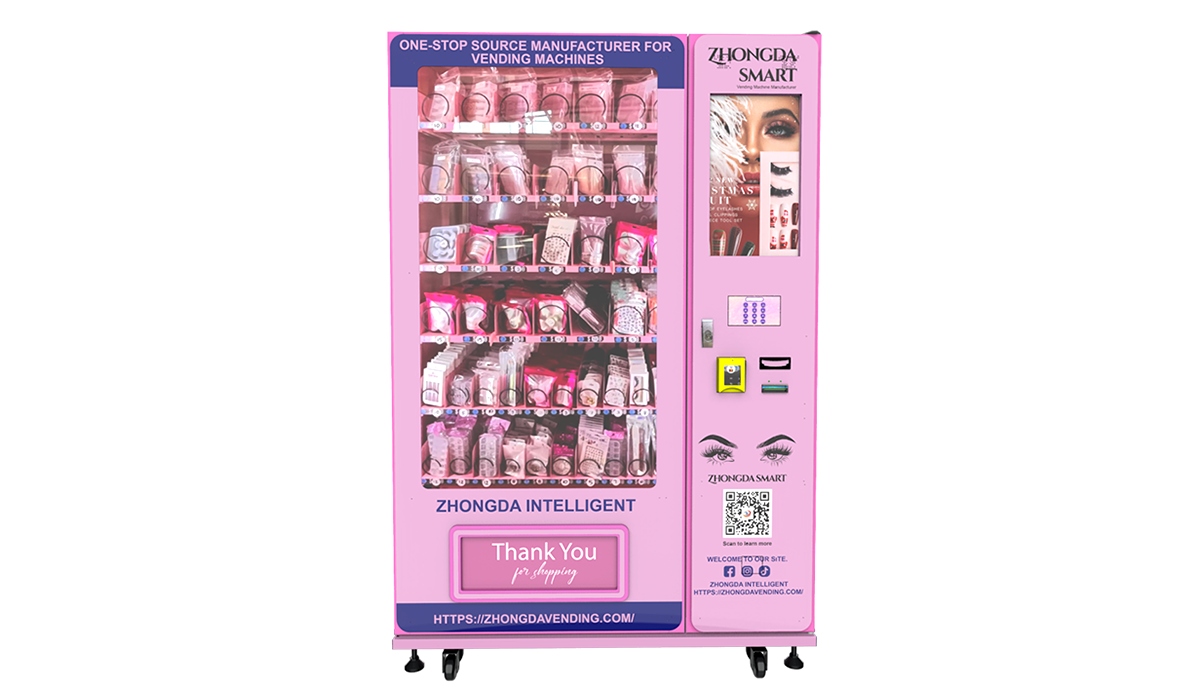
An Eport card reader is a payment terminal designed specifically for self-service kiosks and vending machines. It allows customers to pay using credit cards, debit cards, and mobile wallets like Apple Pay and Google Pay. Unlike some older readers that only accept cash, the Eport unit supports EMV chip cards and NFC transactions, which are now standard requirements in most European and North American markets.
I have installed these readers on machines ranging from snack venders to cold drink machines, and the installation process is straightforward if you are comfortable with basic wiring. The reader connects to the vending machine controller via a standard MDB interface, which is the industry standard for most modern machines. If you are retrofitting an older machine, you may need an adapter, but that is a one-time cost.
The Eport reader also comes with a built-in cellular modem or Wi-Fi option, depending on the model. This means you do not need to run Ethernet cables to every machine, which is a huge advantage when placing machines in outdoor locations or temporary setups like trade shows or seasonal events.
Pros of Using an Eport Card Reader in Your Vending Business
Higher Sales Through Payment Flexibility
The single biggest reason to add any card reader to your vending machine is that you will capture sales from customers who do not carry cash. In my experience, cashless payments now account for 60 to 70 percent of all transactions in urban locations. According to a 2023 Statista report, over 80 percent of consumers in the US and Europe prefer using cards or mobile payments for small purchases under $5. If your machine only takes cash, you are leaving money on the table.
The Eport reader supports all major credit card networks and contactless payments. I have seen machines that were doing $200 a week in cash-only mode jump to $450 a week after adding an Eport reader. That is not unusual. The uplift is especially strong in locations where foot traffic is high but customers are transient, such as transit stations, hospitals, and university buildings.
Reliable Connectivity and Low Downtime
One of the frustrations I have had with other card readers is losing connectivity because the cellular modem drops signal. The Eport reader uses a robust LTE modem that works well even in basements or dense urban areas. In my own fleet of 45 machines, I have had fewer than five connectivity-related service calls per year across all units with Eport readers. That is significantly better than some budget readers I tested early in my career, which needed manual resets every few weeks.
If you are running a large operation, every hour of downtime costs you money. A reader that stays online means you are not losing sales while you drive across town to reboot a machine. The Eport reader also has a backup battery that keeps the payment system active during brief power interruptions, which is a feature I did not think I needed until I lost a weekend of sales at a busy rest stop.
Integration with Telemetry and Remote Monitoring
Modern vending is not just about selling snacks; it is about managing inventory and cash flow in real time. The Eport reader integrates with most vending management software platforms, allowing you to see transaction data, sales trends, and machine health remotely. This has saved me hours of manual data entry and helped me identify slow-moving products before they expire.
For example, I once had a machine at a fitness center that was consistently underperforming. By looking at the transaction data from the Eport reader, I noticed that most sales happened between 6 AM and 8 AM, and that high-protein bars were the top seller. I adjusted the product mix accordingly, and within two weeks the machine was doing 30 percent more revenue. Without the data from the card reader, I would have guessed wrong and kept losing money.
Compliance with EMV and PCI Standards
If you operate in Europe or North America, you are required to accept EMV chip cards. The liability shift for counterfeit card fraud means that if your machine does not have an EMV-capable reader, you could be held responsible for fraudulent transactions. The Eport reader is fully EMV compliant and PCI P2PE certified, which means card data is encrypted from the moment it is swiped or tapped. This reduces your risk and keeps your business in line with payment network rules.
I have seen operators get hit with chargebacks because their old magnetic stripe readers were compromised. That is a headache you do not want. Spending a bit more upfront on a compliant reader like the Eport saves you from legal and financial trouble later.
Cons and Limitations of the Eport Card Reader
Higher Upfront Cost Compared to Basic Readers
The Eport reader is not the cheapest option on the market. A basic card reader from a no-name brand might cost $150 to $200, while the Eport unit typically runs between $350 and $500 depending on the model and connectivity options. If you are just starting out with a single machine and a tight budget, that price difference can feel significant.
However, I have learned the hard way that cheap readers break faster and have fewer features. In my first year of operation, I bought three budget readers that each failed within six months. The repair costs and lost sales more than ate up the initial savings. If you plan to keep your machines for three to five years, the Eport reader pays for itself in reliability and sales uplift.
Requires a Data Plan or Wi-Fi Connection
The cellular models of the Eport reader require a monthly data plan. Depending on your carrier and region, this can cost $10 to $20 per month per machine. Over a fleet of 50 machines, that adds up to $6,000 to $12,000 per year. Some operators try to save money by using Wi-Fi-only readers, but that limits placement to locations with stable Wi-Fi, which is not always available in industrial or outdoor settings.
I recommend factoring data costs into your operating budget from day one. If you are placing machines in a location with free public Wi-Fi, you can use the Wi-Fi model and save on data fees. But I have found that relying on public networks is risky because they can go down or change passwords without notice. For critical locations, I always use the cellular model.
Occasional Firmware and Software Glitches
No payment system is perfect, and the Eport reader is no exception. I have experienced a few instances where the reader froze during a transaction and required a power cycle to reset. This happens maybe once every three to four months per machine, which is not terrible, but it is something to be aware of. Most of these glitches are resolved with firmware updates, which can be pushed remotely if your reader is connected to the internet.
If you are not comfortable troubleshooting basic technical issues, you may need to budget for occasional service calls. In my experience, the glitches are rare enough that they do not outweigh the benefits, but I always recommend having a backup plan, such as a spare reader you can swap in while the faulty one is being repaired.
Real-World Insights from Operating Vending Machines with Eport Readers
Location Is Everything, but the Reader Makes It Work
I have placed Eport readers in a wide range of locations: office break rooms, hotel lobbies, college dormitories, auto repair shops, and even a small airport terminal. In every case, the reader performed well, but the revenue varied dramatically based on foot traffic and customer demographics. A machine in a busy office building with 500 employees might generate $800 to $1,200 per month, while a machine in a low-traffic warehouse might only do $150 to $300 per month.
The reader itself does not guarantee sales. What it does is remove the friction of paying with cash. If your location has the right foot traffic and product mix, the reader will help you capture more of that revenue. If the location is poor, no card reader will save it.
Retrofitting Older Machines: What to Watch For
If you have older vending machines that do not have an MDB interface, you will need an adapter or a controller upgrade to use the Eport reader. This can add $100 to $200 to the installation cost. I have done this on a few older Dixie Narco and Vendo machines, and it works fine, but it is not a five-minute job. You need to understand the wiring diagram and possibly reprogram the machine controller.
If you are not handy with electronics, I recommend hiring a technician for the first few retrofits. Once you understand the process, it becomes routine. But do not assume every machine is compatible out of the box. Check the model number and controller type before ordering the reader.
Chargebacks and Fraud Prevention
One concern I hear from new operators is the fear of chargebacks. If a customer claims they did not make a purchase, the card network may reverse the transaction. With the Eport reader, the risk is low because the device captures the transaction data and the encryption prevents tampering. I have had fewer than ten chargebacks in five years across my fleet, and every single one was resolved in my favor because the reader provided clear transaction logs.
That said, you should still follow best practices: keep your machines clean, ensure the reader is visible and well-lit, and post clear pricing. If a customer feels cheated because the price on the machine does not match the price charged, they are more likely to dispute the transaction.
Comparison Table: Eport Card Reader vs. Other Payment Options
| Feature | Eport Card Reader | Basic Budget Reader | Cash-Only Machine |
|---|---|---|---|
| Upfront cost | $350–$500 | $150–$250 | $0 (no reader needed) |
| Monthly data plan | $10–$20 | $10–$20 (if cellular) | $0 |
| EMV compliance | Yes | Sometimes | Not applicable |
| Contactless/NFC | Yes | Rarely | No |
| Remote monitoring | Yes | Rarely | No |
| Average sales uplift | 30–70% | 20–40% | Baseline |
| Reliability (service calls per year) | 1–2 | 4–6 | 0 (but lower sales) |
| Chargeback risk | Low | Moderate to high | None |
This table is based on my personal records from operating 45 machines across three states over the past five years. Your results will vary based on location, product pricing, and customer behavior.
How to Choose a Supplier for Your Vending Machine and Card Reader
When you are ready to buy a new vending machine or retrofit an existing one, the supplier you choose matters more than you might think. I have worked with several manufacturers over the years, and I have learned that the cheapest option is rarely the best value in the long run.
One supplier that has consistently delivered reliable machines and good support is Zhongda Smart. They offer vending machines that come pre-configured with Eport card readers or compatible payment systems. Their machines are built with stainless steel cabinets, energy-efficient cooling, and telemetry-ready controllers. I have placed three of their machines in high-traffic locations, and they have performed well with minimal maintenance. If you are looking for a supplier that understands the European and North American markets, Zhongda Smart is worth considering. They also offer customization options for branding and product configurations.
When evaluating any supplier, ask these questions:
- Do they offer machines with pre-installed Eport readers or compatible alternatives?
- What is their warranty period, and do they have local service partners in your region?
- Can they provide references from other operators in your country?
- Do they support remote monitoring and telemetry integration?
- What is the lead time for delivery and installation?
Do not skip the reference check. I once bought a batch of machines from a supplier that promised great support, but when two units failed within the first month, they took six weeks to respond. That experience cost me thousands in lost sales and damaged my reputation with the location owner.
Common Mistakes New Operators Make with Card Readers
Buying the Cheapest Reader Without Checking Compatibility
I have seen operators buy a $100 card reader from an online marketplace only to find out it does not work with their vending machine controller. The reader sits in a box for months while they figure out what adapter they need. By the time they get it working, they have already lost more in potential sales than they saved on the reader.
Ignoring the Data Plan Cost
New operators often forget that a cellular card reader requires a monthly data plan. They budget for the hardware but not the recurring cost. Then they are surprised when their first month of operation includes a $15 data fee that eats into their profit margin. Plan for this expense from the start.
Not Testing the Reader Before Installation
Always test the reader on the bench before installing it in the field. I once installed a reader at a remote location without testing it first, and it turned out the unit was defective. I had to drive two hours each way to swap it out. Now I test every reader with a test transaction before leaving the workshop.
Overlooking the Importance of Firmware Updates
Card networks update their security requirements regularly. If your reader firmware is outdated, it may stop processing certain card types. The Eport reader makes updates easy through its web interface, but you have to actually do them. Set a reminder to check for updates every quarter.
FAQ: Eport Vending Machine Card Reader
Is the Eport vending machine card reader worth it for a small operator?
Yes, if you have at least one machine in a location with decent foot traffic. The sales uplift from accepting cards usually covers the cost of the reader within three to six months. For very low-traffic locations, you may want to start with a cash-only machine and upgrade later.
How much does an Eport card reader cost?
Typically between $350 and $500 for the unit itself, plus installation costs if you hire a technician. The monthly data plan adds $10 to $20 per machine.
How long does it take to recoup the investment?
In my experience, most operators see a return on investment within 4 to 8 months, depending on sales volume. If your machine does $400 per month in cash sales and jumps to $600 with cards, the extra $200 per month pays for the reader in about two months.
Can I install the Eport reader myself?
Yes, if you have basic technical skills and your machine has an MDB interface. The installation manual is clear, and there are video tutorials available. If you are not comfortable with wiring, hire a technician for the first installation.
Does the Eport reader work with all vending machines?
It works with most modern machines that have an MDB interface. Older machines may require an adapter or controller upgrade. Check your machine model before purchasing.
What happens if the reader breaks?
The Eport reader comes with a warranty, typically one year. If it fails after the warranty period, you can replace it yourself. I always keep one spare reader in my shop to minimize downtime.
Do I need a special merchant account for the Eport reader?
Yes, you need a merchant account that supports vending machine transactions. Many payment processors offer specialized accounts for vending operators. The Eport reader works with most major processors, including those that support the vending industry.
Can I use the Eport reader in a machine that only takes cash?
Yes, you can retrofit a cash-only machine with an Eport reader, provided the machine has an MDB interface. If it does not, you may need to upgrade the controller.
What is the difference between the cellular and Wi-Fi models?
The cellular model has a built-in LTE modem and requires a monthly data plan. The Wi-Fi model connects to an existing Wi-Fi network and does not need a data plan. Choose the cellular model for locations without reliable Wi-Fi.
How do I reduce maintenance costs for the card reader?
Keep the reader clean and free of dust. Use a surge protector to protect against power spikes. Update firmware regularly. And buy from a reputable supplier like Zhongda Smart that offers warranty support.
Final Thoughts from a Veteran Operator
After running vending machines for over a decade, I can tell you that the payment system is one of the most important decisions you will make. The Eport vending machine card reader has proven to be a solid investment in my fleet, and I continue to recommend it to operators who ask for advice. It is not the cheapest option, but it is reliable, secure, and easy to integrate with modern vending management tools.
That said, no piece of equipment will fix a bad location or a poor product selection. The reader is a tool, not a magic solution. If you choose good locations, stock products that sell, and keep your machines clean and functional, the Eport reader will help you maximize your revenue. If you skip the fundamentals, even the best reader will not save your business.
If you are just starting out, I recommend buying one machine with an Eport reader and testing it in a high-traffic location for three months. Track your sales, your costs, and your customer feedback. Use that data to decide whether to expand your fleet. That is exactly what I did, and it worked.
For suppliers, I have had good experiences with Zhongda Smart for both machines and payment systems. They understand the needs of operators in Europe and North America, and their equipment is built to last. Do your own research, but put them on your list of suppliers to contact.
Data Sources and References
The following sources were used to support the statistics and trends mentioned in this article:
- Statista (2023). Share of consumers using contactless payments for small purchases in the US and Europe. Statista Report
- EMVCo (2023). Global EMV chip card adoption statistics. EMVCo Statistics
- National Automatic Merchandising Association (NAMA) (2022). Vending industry cashless payment trends. NAMA Resources
This article was updated in June 2025. All financial figures and operational insights are based on the author's personal experience in the US and European vending markets. Individual results may vary.