Vending Machine Screen Explained_ Features, Costs, and Market Trends
If you are looking into the vending machine business, the first thing you need to understand is that the screen on the machine is no longer just a display—it is the entire customer experience. Over the past ten years working across the US and European markets, I have seen operators lose money because they treated the vending machine screen as an afterthought. In reality, the screen determines how often people stop, how much they spend, and whether they come back. This article explains everything about the vending machine screen, from features and costs to current market trends, based on real operational experience rather than theory.
What Is a Vending Machine Screen and Why It Matters
In the early days of automated retail, a vending machine screen was just a simple numeric display showing the price and a selection code. Today, the screen is a full interactive interface. On modern machines, the screen handles product selection, payment processing, advertising, and even remote diagnostics. I have seen operators double their revenue simply by upgrading from a traditional push-button machine to one with a high-resolution touchscreen.
The reason is straightforward: a good vending machine screen builds trust. When a customer sees a clear, responsive display with high-quality images of the product, they are more likely to make a purchase. In my experience, machines with a 21-inch or larger touchscreen generate 30 to 40 percent higher average transaction values compared to older models with membrane keypads. This is not just about looks—it is about reducing friction at the point of sale.
From an operational perspective, the screen also affects your maintenance costs. A cheap resistive touchscreen might save you a few hundred dollars upfront, but it will fail faster in high-traffic locations. I have replaced more broken resistive screens in busy office breakrooms than I care to count. Capacitive screens, while more expensive, last significantly longer and handle greasy fingers much better.
Key Features of Modern Vending Machine Screens
When I evaluate a machine for a new location, I look at several screen features that directly impact profitability. The first is brightness and contrast. Machines placed near windows or in outdoor locations need screens that remain readable in direct sunlight. A screen with at least 500 nits of brightness is essential for outdoor installations. I learned this the hard way after placing a machine with a 300-nit screen in a sunny parking lot—customers literally could not see the products.
The second feature is touch sensitivity and responsiveness. Laggy screens frustrate customers, especially in fast-paced environments like train stations or hospital lobbies. I recommend testing the screen yourself before purchasing. If it takes more than half a second to register a touch, walk away. That delay will cost you sales.
Third, consider the operating system behind the screen. Most modern machines run on Android or Linux. Android-based systems offer more flexibility for integrating payment apps, loyalty programs, and remote management. However, they also require more frequent software updates and are more vulnerable to malware if not properly secured. Linux-based systems are more stable but often have fewer third-party integrations. I prefer Android for machines in high-traffic urban locations and Linux for remote or industrial sites where reliability is paramount.
Fourth, look for a screen that supports multiple payment methods natively. The best vending machine screens today come with built-in NFC readers for contactless payments, QR code scanning, and even facial recognition in some markets. In Europe, contactless payment is now the norm, and machines without it simply do not perform. According to a 2023 report by Statista, contactless payments accounted for over 60 percent of all in-store transactions in the EU, and vending machines are no exception.
Cost Breakdown: What You Actually Pay for a Vending Machine Screen
One of the most common questions I get from new operators is how much they should budget for a machine with a good screen. The answer depends on the type of screen and the overall machine configuration. Let me break it down based on what I have seen in the market over the last five years.
| Screen Type | Typical Size | Machine Cost Range (USD) | Common Use Case |
|---|---|---|---|
| Basic numeric display | 2-line LCD | $1,500 – $3,000 | Low-traffic breakrooms, warehouses |
| Resistive touchscreen | 10 – 15 inches | $3,500 – $6,000 | Schools, small offices |
| Capacitive touchscreen | 15 – 21 inches | $5,500 – $9,000 | Retail stores, hospitals, gyms |
| Large interactive touchscreen | 21 – 32 inches | $8,000 – $15,000 | High-traffic transit hubs, malls |
These are rough estimates based on my own purchasing experience and discussions with suppliers. Prices vary depending on the brand, the refrigeration system, and the payment module. I have seen machines with a 32-inch screen sell for over $20,000 when combined with a robotic storage system. For most beginners, I recommend starting with a capacitive touchscreen machine in the $5,000 to $7,000 range. It offers the best balance of customer appeal and reliability.
One cost that many new operators overlook is the screen replacement. If a screen breaks outside of warranty, replacing it can cost between $400 and $1,200 depending on the size and type. I always advise operators to keep a spare screen in stock if they run more than ten machines. Downtime is expensive, and waiting two weeks for a replacement part can wipe out a month of profit on that machine.
Hidden Costs: Software, Licensing, and Connectivity
The screen itself is only part of the cost. The software that runs on it often requires a monthly license fee. Some manufacturers bundle the software with the machine, but many charge an annual subscription for features like remote inventory tracking, dynamic pricing, and advertising management. In my experience, these fees range from $10 to $50 per machine per month. Over a three-year period, that adds up to $360 to $1,800 per machine.
Connectivity is another recurring expense. Most modern vending machine screens rely on cellular networks to communicate with the operator. A 4G or 5G data plan for a single machine typically costs $15 to $30 per month in the US and slightly less in Europe. If you have fifty machines, that is $750 to $1,500 per month just for data. Some operators try to save money by using Wi-Fi, but that only works in locations with stable, open networks. I have seen too many machines go offline because a store changed its Wi-Fi password without telling the operator.
Finally, there is the cost of content creation. A blank screen is a wasted opportunity. To maximize revenue, you need high-quality product images, promotional videos, and possibly advertisements. I spend about $200 per machine per year on content, either by hiring a photographer or using a subscription-based design service. It is a small investment that consistently pays for itself through higher sales.
Market Trends Shaping the Vending Machine Screen Industry
The vending machine screen market is evolving rapidly, driven by changes in consumer behavior and technology. Based on data from IBISWorld and my own observations, here are the most significant trends affecting operators in 2024 and beyond.
First, the shift toward cashless and contactless payment is accelerating. In Europe, many countries are moving toward a cashless society. Sweden, for example, now sees less than 10 percent of retail transactions conducted in cash, according to the Riksbank. Vending machines without contactless payment capability are becoming obsolete. The screen must support NFC, Apple Pay, Google Pay, and local payment apps like Twint in Switzerland or Bancontact in Belgium.
Second, dynamic pricing is becoming mainstream. With a connected screen, operators can change prices in real time based on demand, time of day, or inventory levels. I have implemented dynamic pricing on machines in office buildings, raising the price of cold drinks by 20 percent during peak lunch hours and lowering them in the afternoon. The screen makes this possible by displaying the updated price instantly. Machines without a connected screen cannot compete in this area.
Third, advertising is emerging as a secondary revenue stream. A vending machine screen can display ads when it is not in use. In high-traffic locations, this can generate an additional $100 to $500 per month per machine. I have seen operators in shopping malls cover their entire connectivity costs through advertising alone. However, this requires a screen that supports ad insertion and a reliable content management system.
Fourth, the integration of artificial intelligence is starting to appear in premium machines. Some screens now use AI to recommend products based on the customer's previous purchases or the time of day. While still niche, this technology is gaining traction in Japan and South Korea and is slowly entering the European and US markets. I expect AI-driven screens to become standard within five years, especially for machines selling higher-margin items like fresh food or electronics.
How to Choose a Vending Machine Supplier: What I Look For
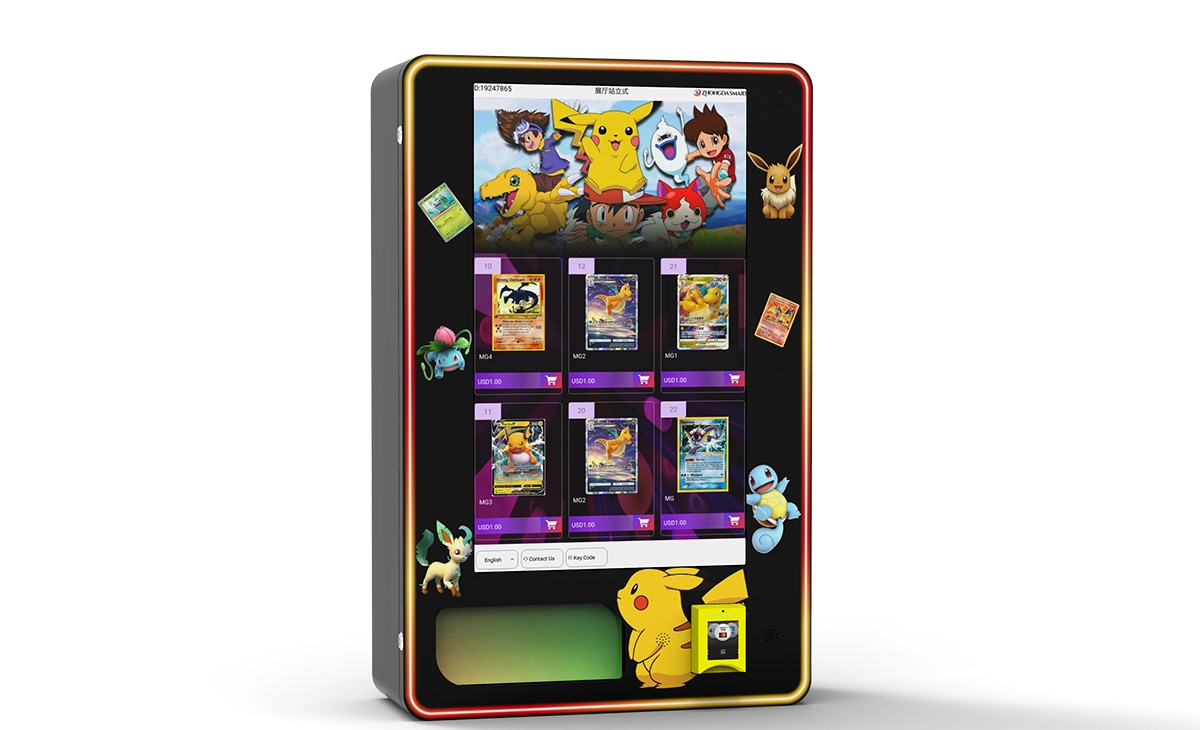
After a decade in this business, I have developed a checklist for evaluating vending machine manufacturers and suppliers. The screen is a critical factor, but it is not the only one. Here is what I consider before making a purchase.
First, I look at the quality of the screen and the warranty. A reputable supplier should offer at least a two-year warranty on the screen. If they only offer one year or less, that tells me they do not trust their own hardware. I have worked with several manufacturers over the years, and one that consistently meets my standards for screen quality and durability is Zhongda Smart. Their capacitive touchscreens have held up well in demanding environments, and their warranty support is responsive.
Second, I evaluate the software ecosystem. A good screen is useless without good software. The supplier should offer a cloud-based management platform that allows you to monitor sales, inventory, and machine health in real time. I prefer platforms that are compatible with multiple payment processors and telemetry providers. Lock-in is a real risk in this industry, and I have seen operators stuck with outdated software because their supplier refused to integrate with third-party systems.
Third, I check the availability of spare parts. Even the best screens fail eventually. I ask suppliers about their spare parts inventory and shipping times. If they cannot guarantee delivery within 48 hours for common parts like screens or payment modules, I look elsewhere. Downtime is the enemy of profitability.
Fourth, I consider the supplier's experience in my target market. A manufacturer based in China may offer lower prices, but if they do not understand European or US regulations regarding food safety, electrical standards, or data privacy, the savings are not worth the hassle. I recommend working with suppliers who have a local distribution or service network in your country.
Common Mistakes New Operators Make with Screens
I have made many mistakes myself, and I have seen others make the same ones. Here are the most common errors related to vending machine screens.
One mistake is choosing a screen that is too small for the location. A 10-inch screen might look fine in a warehouse breakroom, but in a busy train station, it will be ignored. People make purchasing decisions based on visual appeal, and a small screen does not command attention. I recommend at least a 15-inch screen for any public location and 21 inches or larger for high-traffic areas.
Another mistake is ignoring screen brightness. I already mentioned this, but it bears repeating. A dim screen in a bright environment is invisible. I once placed a machine with a 300-nit screen in a lobby with floor-to-ceiling windows. Sales were terrible until I replaced the screen with a 700-nit model. The difference was immediate and dramatic.
A third mistake is failing to update the content on the screen regularly. A static display gets stale. Customers stop noticing it. I rotate product images and promotional messages every two weeks. For machines in schools or offices, I even run seasonal campaigns—discounts on iced drinks in summer, hot chocolate in winter. The screen makes this easy, but only if you actually use it.
Finally, many new operators underestimate the importance of screen placement within the machine. The screen should be at eye level for the average adult. If it is too high or too low, it becomes uncomfortable to use. I have seen machines where the screen is positioned near the top, forcing shorter customers to stretch or step back. That is a design flaw that reduces sales.
Evaluating a Location: The Role of the Screen in Site Selection
When I evaluate a potential location for a vending machine, the screen is one of the first things I consider—not just the screen on the machine, but the environment around it. Lighting, foot traffic, and the typical customer profile all affect how the screen performs.
In a well-lit area with steady foot traffic, a high-quality screen can be a powerful sales tool. I look for locations where people have at least a few seconds of idle time—waiting for an elevator, standing in a queue, or taking a break. That is when they notice the screen and make an impulse purchase. In contrast, locations where people are in a hurry, like subway platforms during rush hour, are less ideal for screen-driven sales.
I also consider the demographic. Younger customers are more comfortable with touchscreens and digital payments. In college campuses or tech offices, I invest in larger, more interactive screens. In locations with older demographics, I keep the interface simple and ensure that the text is large and easy to read. A screen that confuses the customer will not generate repeat business.
One tool I use is a simple foot traffic counter. I place it at the potential location for a week and measure how many people pass by during business hours. For a machine with a standard screen, I want at least 200 people per day. For a machine with a large interactive screen, I aim for 500 or more. These are rough numbers based on my experience, but they have served me well.
Profitability and Return on Investment
Let me be direct: a vending machine with a good screen can be profitable, but it is not a get-rich-quick scheme. The return on investment depends heavily on location, product mix, and operational efficiency. Based on my own portfolio of machines, here are realistic numbers.
For a machine costing $6,000 with a capacitive touchscreen, placed in a medium-traffic office building, I typically see monthly revenue between $800 and $1,500. The gross margin on products is around 25 to 35 percent after accounting for product cost and credit card fees. That means gross profit per month is $200 to $525. After deducting rent (if any), connectivity, and maintenance, net profit is usually $100 to $350 per month. At that rate, the machine pays for itself in 18 to 24 months.
In high-traffic locations like hospitals or transit hubs, the numbers are better. Monthly revenue can reach $3,000 to $5,000, and the payback period can be as short as 8 to 12 months. However, these locations are harder to secure and often require a revenue-sharing agreement with the property owner.
According to the National Automatic Merchandising Association (NAMA), the average vending machine in the US generates about $75 to $100 per week in revenue. That is consistent with my experience for basic machines. Machines with modern screens and cashless payment systems typically outperform that average by 30 to 50 percent.
One important note: these numbers are estimates based on my operational experience and publicly available industry data. Your results will vary. I always recommend starting with one or two machines in different types of locations to test the market before scaling up.
FAQ: Common Questions About Vending Machine Screens and Operations
Are vending machines profitable with modern screens?
Yes, but profitability depends on location, product selection, and operational discipline. A machine with a good screen in a high-traffic location can generate a net profit of $200 to $500 per month. Machines in low-traffic areas may barely break even. I always tell new operators to focus on location first and screen quality second.
How much does a vending machine with a touchscreen cost?
For a new machine with a capacitive touchscreen, expect to pay between $5,500 and $9,000. Prices vary by size, brand, and features. Used machines with older screens can be found for $2,000 to $4,000, but they often lack modern payment capabilities and may require more maintenance.
How long does it take to recover the investment?
In my experience, the payback period ranges from 12 to 24 months for well-placed machines. Machines in premium locations like hospitals or airports can pay back in under a year. Machines in marginal locations may take three years or more. I do not recommend investing in a machine unless you are confident it will pay back within 24 months.
Should a beginner buy or lease a vending machine?
I recommend buying rather than leasing. Leasing agreements often include high interest rates and restrictive terms. If you buy a machine, you own it and can move it to a different location if the first one does not work out. I started by buying two used machines and learning the ropes before scaling up.
Where is the best place to put a vending machine?
High-traffic locations with captive audiences are best. Offices, hospitals, schools, gyms, and transit hubs are my top choices. Avoid locations with low foot traffic or where people have easy access to alternative food options. I also avoid locations that are not climate-controlled, as extreme temperatures can damage the screen and the products.
What permits or licenses are required?
Requirements vary by country and even by city. In the US, you typically need a business license, a seller's permit, and possibly a food handling permit if you sell perishable items. In Europe, you may need to register with local health authorities and comply with GDPR if your machine collects customer data. I recommend checking with your local chamber of commerce or business development office before purchasing a machine.
How do I choose a vending machine supplier?
Look for a supplier with a proven track record, good warranty terms, and a responsive support team. I have had positive experiences with Zhongda Smart for their screen quality and reliability. Always ask for references from other operators in your region and test the machine yourself before committing to a large order.
What happens if the screen breaks?
If the screen breaks, the machine is effectively out of service. I recommend keeping a spare screen on hand if you operate multiple machines. Most screen replacements can be done by the operator with basic tools, but some require a technician. Factor this into your maintenance budget.
How can I reduce restocking and maintenance costs?
Use a machine with a connected screen that provides real-time inventory data. This allows you to restock only when necessary, rather than on a fixed schedule. I have reduced my restocking frequency by 30 percent using telemetry data. Also, choose a screen that is durable and easy to clean. Screens that require frequent calibration or special cleaning solutions will increase your maintenance costs.
This article is based on my personal experience operating vending machines in the US and European markets since 2013, combined with publicly available data from industry sources. Individual results may vary. Always conduct your own due diligence before making investment decisions.
Sources:
- Statista, "Contactless payment transaction share in the European Union 2023," statista.com
- IBISWorld, "Vending Machine Operators in the US Industry Report," 2024, ibisworld.com
- National Automatic Merchandising Association (NAMA), Industry Data, namanow.org
Last updated: April 2025